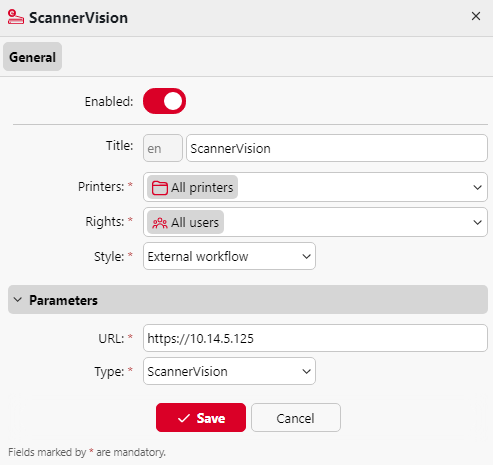
After configuring ScannerVision (network settings, templates, clients, users), you should create a MyQ Smart Workflow in Terminal Actions.
-
Go to MyQ > Settings > Terminal Actions.
-
Right-click on Home screen, select Add action into this folder, and then click on External workflow on the list of actions. The action is added to the list and the terminal preview. Double-click on it to modify its settings. The node's properties panel opens on the right side.
-
Fill out the External workflow as follows
-
Enter a Title: the name of the External workflow action in the Home screen pane and on the terminal preview.
-
Change the Printers and/or Rights if you want to create a specific MyQ Smart Workflow.
d. Click Save. -
Enter the URL of the ScannerVision server <hostname>:<port>. The port number is not required if the default settings (80 for non SSL and 443 for SSL) are used on the ScannerVision server. If the port was changed, the port number is required.
-