
MyQ Scan Review works with the Easy Scan terminal action to create a document review workflow which supports replacement scanning processes. It enables organizations to capture paper documents, review scanned images, and maintain an auditable record of the scanning process before hard copies are archived.
For full details of how to install and use Scan Review see MyQ Scan Review.
Establish Trust
Before pairing Scan Review with MyQ X, establish certificate trust between the two systems.
-
Obtain the CA certificate that issued the MyQ X server certificate. If MyQ X uses the built-in MyQ Certificate Authority, open the MyQ X Web Interface, go to MyQ > Settings > Network, and select Export CA Certificate.
-
Install the CA certificate on the Scan Review machine in the Trusted Root Certification Authorities store.
-
Install the CA certificate that issued the Scan Review server certificate on the MyQ X server in the Trusted Root Certification Authorities store.
-
If applicable, run the System Maintenance task in MyQ X to refresh the list of trusted Certificate Authorities. See Task Scheduler Settings.
Add a MyQ Scan Review Connection
You pair the connection in two places: generate a pairing code in MyQ, then enter the code in Scan Review.
-
Sign in to the MyQ web administrator interface with the Administrator or Manage settings rights.
-
Go to MyQ > Settings > Connections, click Add, and select MyQ Scan Review.
-
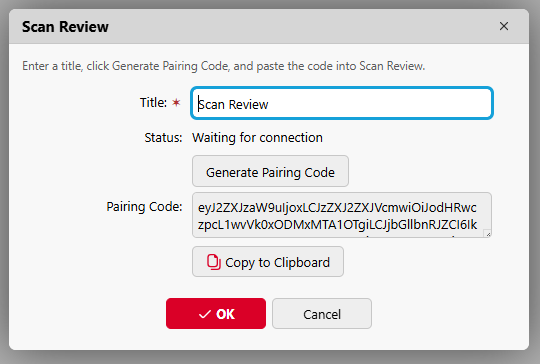
In Title, enter a name for the Scan Review connection.
-
Click Generate Pairing Code and copy the code. The pairing code is valid for 5 minutes. If it expires, close the connection dialog, open it again, and generate a new code.
-
On the Scan Review machine, open the Scan Review web interface: use the Scan Review system tray menu, or go to
http://localhost:7184in a browser. -
Enter the pairing code and click Save and continue.
-
In Scan Review, configure the Scan Review hostname and HTTPS certificate. See Configure Scan Review.
-
When Scan Review prompts you, sign in with a MyQ user account other than *admin.
After pairing, Scan Review registers its own REST API application in MyQ and sets up the connection. The Scan Review destination is now available in the Easy Scan terminal action.