
MyQ Document Processor is a separate MyQ service that handles advanced document processing for Easy Scan jobs, including OCR, page splitting, and blank page removal. We recommend that you install Document Processor on a different machine from your Print Server system.
If multiple Document Processor connections are configured, MyQ selects one at random for each job.
Prerequisites
Document Processor must be installed and configured, and the Print Server machine must trust the Document Processor machine. Obtain the following values from the Document Processor server before configuring the connection:
-
Hostname and port
-
Client ID
-
Secret
Add a MyQ Document Processor Connection
-
Go to MyQ > Settings > Connections and click Add.
-
Select MyQ Document Processor.
-
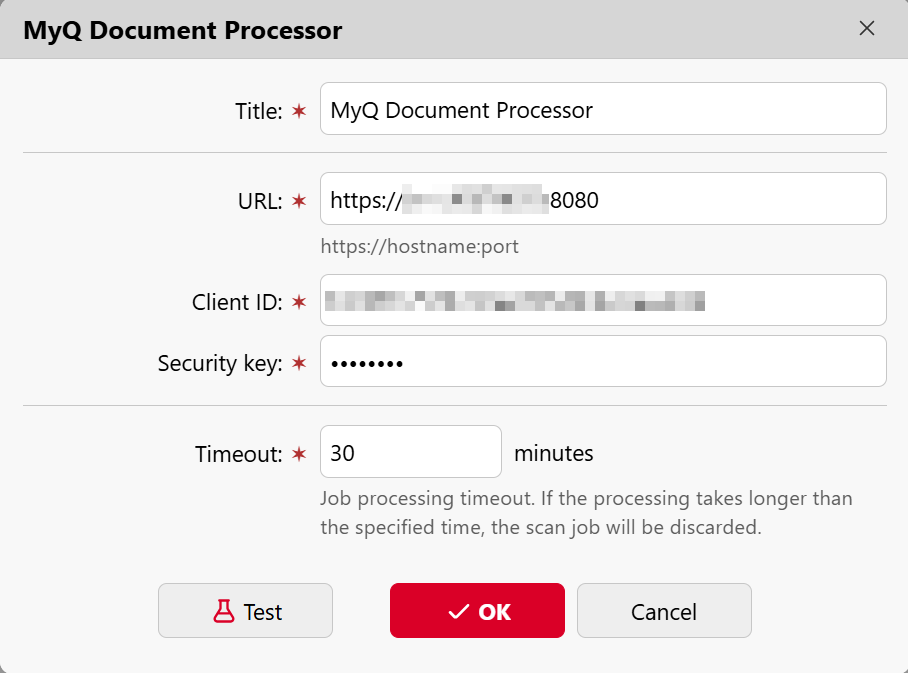
Configure the following fields:
-
Title: enter a name for the Document Processor connection.
-
URL: the hostname and port of the Document Processor server. For example:
https://docprocessor:8080 -
Client ID: the client number configured in the Document Processor server
-
Security key: the secret that correspond to the client ID.
-
Timeout: The job processing timeout. If processing takes longer than this value, the scan job is discarded. Default: 30 minutes.
-
-
Click Test to verify the connection, then click OK.
Important: You must use the server hostname in the URL. IP addresses are not supported.