
Before you add SharePoint Online as a scan destination, you must first set up a SharePoint Online connection.
Prerequisite
Create and set the SharePoint Online destination
-
Open an Easy Scan terminal action and on the Destinations tab select Cloud storage in the +Add dropdown.
-
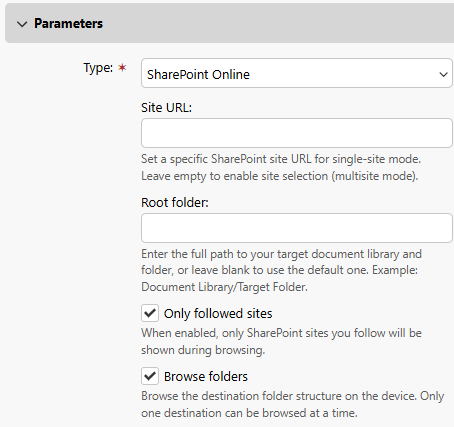
In the Parameters section, select SharePoint Online.
-
(Optional) Specify a Site URL and root folder for the scan destination to narrow the destination to one SharePoint site. The terminal does not show a site list. When folder browsing is enabled users can browse only within that site. When empty, the terminal shows a list of all sites or followed sites only; users select a site at the terminal. When folder browsing is enabled, users can browse document libraries and folders across SharePoint Online sites.
-
(Optional) Select Only followed sites to display only sites that the user follows. This option is unavailable in multi-site mode, and when application-wide access is enabled in the SharePoint Online connection settings.
-
(Optional) Select Browse folders to enable users to navigate within the SharePoint directory hierarchy.