
Regular expressions provide a powerful way to manipulate user data during synchronization. Administrators can use this feature to ensure that the imported data into MyQ is precisely in the format and content they desire. Always test your regular expressions before applying them to real data to avoid unexpected results.
This feature is supported for LDAP and Entra ID synchronization sources only.
Use RegEx Transformation for User Synchronization:
-
Go to MyQ > Settings > User Synchronization.
Depending on your setup, double-click either on your LDAP or Entra ID Synchronization for the synchronization settings to open on the right. -
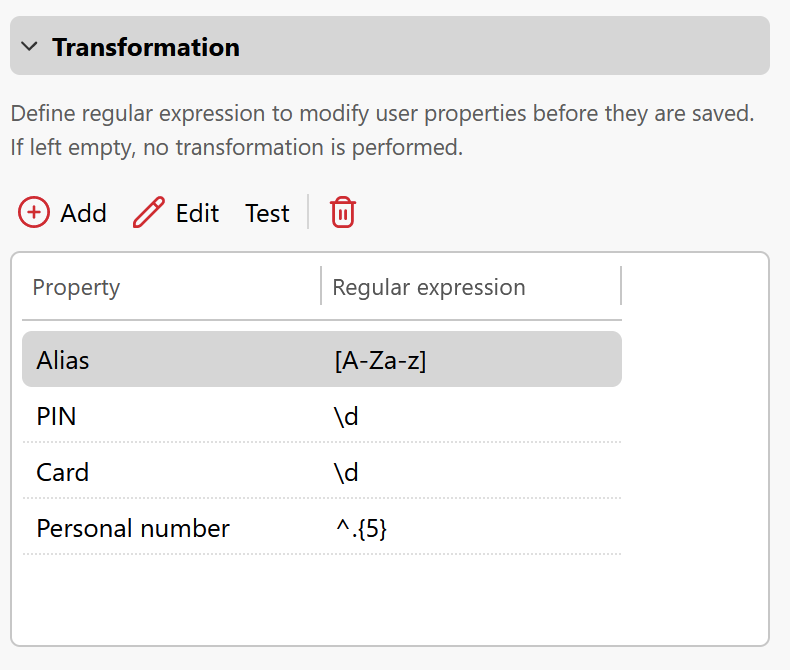
In the Users tab, scroll down and expand Transformation.
-
You can add and configure the following supported user properties:
-
Alias
-
Card
-
PIN
-
Personal number
-
Click Add and for each property, input your desired regular expression in the provided field to modify the respective user property.
-
-
Click Test to check your regular expression. A regular expression test dialogue opens.
-
Type a string you want to test in Text to test.
-
Enter your regular expression.
-
Click Test.
The post-transformation output appears. Use this feature to help ensure that the expression works as intended before applying it to actual user data.
-
RegEx Examples
Scenario: Remove any non-digit characters from PINs.
-
RegEx:
\d
If the PIN is '12a3b4', the transformed value will be '1234'.
If the source string contains no digit characters, the output value will be empty. Only characters matched by RegEx will be copied to the output.
Scenario: Remove all characters except the alphabetical ones from card numbers.
-
RegEx:
[A-Za-z]
For a Card number '1234-5678', this will transform it to '12345678'.
If the source string contains no alphabetical characters, the output value will be empty. Only characters matched by RegEx will be copied to the output.
Scenario: Only keep the first 5 characters of the personal number.
-
RegEx:
^.{5}
For a Personal number '1234567890', this will transform it to '12345'.
If the source string’s length is less than 5 characters, the output value will be empty. Only characters matched by RegEx will be copied to the output.
Scenario: Only keep the last 3 characters of the personal number.
-
RegEx:
.{3}$
For a Personal number '1234567890', this will transform it to '890'.
If the source string’s length is less than 3 characters, the output value will be empty. Only characters matched by RegEx will be copied to the output.