
In the Users settings tab (MyQ > Settings > Users), you manage MyQ users’ General settings, New user registration settings, Web Interface Session Timeout, and MyQ Account lockout options.
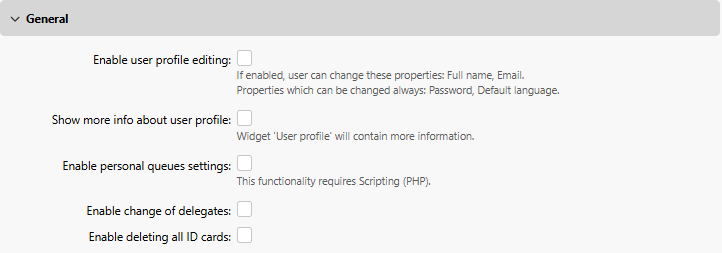
General Settings
-
Enable user profile editing - If enabled, users will be able to change their full name and email.
-
Show more info about user profile - If enabled, the User profile widget will contain more user-related information (Personal number, Phone, PIN, Card, Aliases, Notes).
-
Enable personal queues settings - If enabled, users can use personal queues.
-
Enable delegate changes - If enabled, users will be able to change their delegates.
-
Enable deleting all ID cards - If enabled, users will be able to delete all their ID cards.
See also:
If all of the above are enabled, the users can view additional user information, Edit their account, Delete all ID cards, and use Personal Queues in their User profile widget:
New user registration
Enable and configure automatic user registration to MyQ in a variety of ways.
See also: Automatic User Registration
Web Interface Session Timeout

Set the idle timeout duration for web sessions, in minutes. If a user session is inactive for longer than the configured period, the session expires and the user must log in again. Changes take effect immediately for new requests without requiring a server restart.
-
Range: 1 to 43,200 minutes (up to 30 days)
-
Default: 1,440 minutes (24 hours)
Account lockout
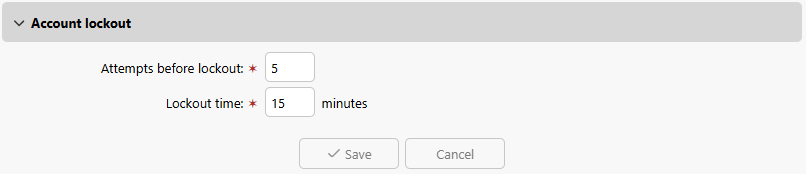
Configure the maximum failed login attempts before a user is locked out, and the duration of the lockout time.
-
Attempts before lockout
Number of failed login attempts before user is locked out.-
Range: 1 – 100
-
Default: 5
-
-
Lockout time
Period, in minutes, that a user must wait before they can attempt to log in again.-
Range: 1 – 144,000
-
Default: 15
-