
MyQ X 10.3 expands the proven MyQ X platform with new capabilities for driverless printing, document automation, secure print release, and trustworthy digitization.
For full details about the latest version, see:
This version is not a replacement for MyQ X 10.2, which will continue to receive maintenance, security updates, bug fixes, and support. MyQ X 10.3 builds on that foundation and helps organizations prepare for where printing and document workflows are heading.
Four Challenges, Four Answers
The print environment is changing:
-
Microsoft is moving Windows printing away from legacy third-party drivers and towards IPP.
-
Digitization projects need scanned documents to be searchable, separated, editable, and ready to use.
-
Organizations need simple secure print release, even where no client or embedded terminal is available.
-
Regulated digitization requires more than a scan: the complete process must be trustworthy and auditable.
MyQ X 10.3 responds with four major capabilities:
-
Enhanced IPP support for the changing Windows print architecture.
-
Document Processor for automated document processing.
-
Release Stations for kiosk-based secure print release.
-
Scan Review for controlled and auditable digitization.
Get Ready for the Changing Windows Print Architecture
Microsoft is moving Windows printing toward a standards-based, driverless model built around IPP. With Windows Protected Print, conventional third-party print drivers and standard TCP/IP ports are no longer available.
MyQ X 10.3 meets this transition with enhanced IPP support. New IPP pass-through mode allows a MyQ queue to present the capabilities of its target printer to users printing through IPP or IPPS.
This gives users access to supported device features directly from the standard print dialog, including:
-
Detailed stapling and punching options
-
Paper tray selection
-
Printer-specific capabilities exposed through IPP
IPP pass-through is supported for direct queues and pull print queues using IPP or IPPS output. For pull print queues, administrators can select which assigned printer supplies the advertised capabilities.
Organizations can therefore begin moving toward Windows Protected Print without giving up the advanced print options their users depend on.
MyQ X 10.3 can also require authentication for all jobs submitted through IPP or IPPS, giving administrators greater control over who can submit jobs to MyQ queues.
See also:
Turn Scans into Ready-to-Use Documents
Digitization can save time, reduce costs, and support sustainability goals—but only if the result is useful. A folder full of unprocessed image files simply moves the administrative burden from paper to screen.
MyQ Document Processor adds automated document processing directly to Easy Scan workflows. Scanned documents can be converted into searchable or editable formats, cleaned up, separated, and delivered to their configured destination.
Document Processor provides:
-
OCR processing
-
Searchable PDF and PDF/A output
-
Editable DOCX, XLSX, PPTX, and TXT output
-
Automatic blank-page removal
-
Separation at fixed page intervals
-
Separation using barcode or QR code pages
-
Separation according to matching barcode or QR code values
This allows organizations to replace repetitive manual processing with a consistent workflow initiated directly from the embedded terminal.
Extend Secure Print Release Beyond Embedded Terminals
Secure print release should not depend on every printer having an embedded terminal.
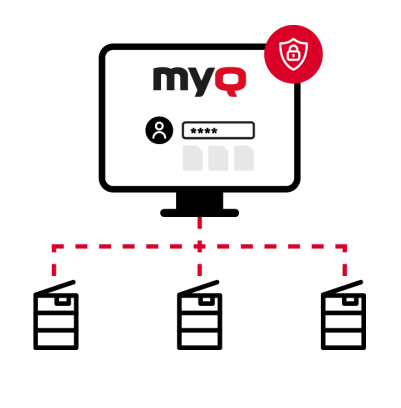
The new Release Station is a browser-based kiosk application that provides a simplified My Jobs experience on a dedicated touchscreen. It can serve a single printer or a shared printing room containing multiple devices.
Users can:
-
Sign in with a PIN, ID card, or MyQ account credentials.
-
Select an available printer.
-
View and manage their queued jobs.
-
Release selected jobs securely.
-
Register an unknown ID card at the Release Station.
Because Release Stations run in browser kiosk mode, no MyQ client application needs to be installed on the kiosk. This makes them suitable for print rooms, education environments, self-service kiosks, and older or non-terminal devices.
Release Stations support Pull Print and Delegated Print queues, as well as credit and quota accounting.
See also: Release Stations
Add Control and Sign-Off to Digitization

In regulated environments, creating a digital copy is not always enough. If the digital document is intended to replace the paper original, the capture and review process may also need to demonstrate that the result is complete, accurate, and trustworthy.
MyQ Scan Review adds quality control, approval, and auditing to Easy Scan workflows.
Users continue to submit documents through the familiar Easy Scan interface. Authorized reviewers can then:
-
Inspect the scanned pages.
-
Search recognized document content.
-
Review captured metadata.
-
Approve or reject the submission.
-
Deliver approved documents to configured archive destinations.
Administrators can configure document queues with designated reviewers, destinations, protection levels, and transfer-note details. A searchable audit log records the relevant actions throughout the workflow.
MyQ Scan Review is intended for organizations with trustworthy-digitization requirements, including environments working according to Germany’s TR-RESISCAN methodology.
See also:
Faster Microsoft Entra ID Synchronization
MyQ X 10.3 introduces delta synchronization for Microsoft Entra ID.
Instead of processing the entire directory during every synchronization, MyQ retrieves and applies changes made since the previous delta run. These can include:
-
New users.
-
Updated user attributes.
-
Disabled or deleted accounts.
-
Renamed groups.
-
Group membership changes.
Delta synchronization can run every few minutes, allowing changes in Microsoft Entra ID to reach MyQ much faster. The existing full synchronization continues to run on its regular schedule as a safety net.
Changes to Licenses and Licensing Plans
MyQ X 10.3 brings the new capabilities into a clearer product offering:
MyQ X SMART remains unchanged.
The MyQ X ULTIMATE plan is migrated into MyQ X ENTERPRISE.
MyQ X ENTERPRISE now has these license options:
-
Embedded – enables an activated embedded terminal, plus adds MyQ Document Processor and Smart Workflows (ScannerVision)
-
Embedded Lite – enables a Release Station device and an embedded lite terminal.
-
Embedded Ultimate – activates an embedded terminal with the features of an Embedded license, plus MyQ Scan Review for advanced document review, validation, and sign-off.
-
Printer Provisioning Profiles – enables you to deploy additional printer provisioning profiles.
Existing MyQ X 10.2 projects are not affected by the new model and retain their current licenses.
ScannerVision is no longer included with MyQ licenses. Integration with external ScannerVision workflows remains available, but a separate ScannerVision license is required and is not sold through MyQ.
See also: Licenses