
MyQ X provides several features that can help keep printing operational during server downtime or degraded connectivity when they are enabled and configured before an outage. Choosing and configuring the right combination requires decisions that depend on your device fleet, your deployment of MyQ Desktop Client (MDC), and your availability requirements.
This article covers resilience and high-availability planning. For configuration steps, see the component documentation at the end of this page.
Feature Overview and Vendor Constraints
The available features divide into two categories: those that reduce server dependency during normal operation, and those that maintain print capability during complete server downtime.
|
Feature |
What It Does |
Requires |
Vendor Constraint |
|---|---|---|---|
|
Client Spooling |
Stores jobs on the user's workstation; sends only metadata to the server. Job data travels to the device directly at release, not via the server. |
Desktop Client |
None – any device |
|
Device Spooling |
Sends jobs directly to the device, where they wait for release. Server involvement at release is minimal. |
Embedded terminal |
Kyocera and Ricoh only |
|
Offline Login |
Allows users to authenticate at a terminal when the server is unreachable, using cached credentials. |
Embedded terminal |
Kyocera, Ricoh, and Canon only |
|
Fallback Printing |
Routes jobs to a fallback printer via MDC when the server is unreachable. |
Desktop Client |
No fixed vendor restriction, but device compatibility is not guaranteed. Test each fallback device or model before rollout. |
Fallback Printing Compatibility
Whether a device will accept jobs routed via Fallback Printing depends on the device vendor and model. Some devices reject print jobs that do not originate from their configured accounting server. In some cases this can be overridden in the device's own settings – look for an option to accept unauthorized jobs or jobs from unknown sources. Always test Fallback Printing against your specific devices before rollout. Do not assume it works because it is configured.
Client Spooling vs. Device Spooling
These serve different purposes and are not alternatives to each other. Client Spooling reduces network load and keeps jobs off the server; Device Spooling enables printing directly to a device during server downtime. They can be used together.
What Doesn't Work During a Server Outage
The fallback features keep selected print and login workflows running. Features that depend on the MyQ server stay unavailable until the server is reachable again:
-
MyQ scan workflows, such as Easy Scan and Scan to Me, and other terminal actions. After Offline Login, users can still use device-native panel functions, such as copy.
-
Credit, quota, and projects. Jobs printed during the outage aren't assigned to a project.
-
Job roaming.
-
Sign-in with a username and password, two-factor authentication, or a QR code. Offline Login accepts a PIN or an ID card only.
Usage from offline sessions is accounted when the device reconnects to the MyQ server.
Choosing the Right Features for Your Environment
The vendor constraints in the table above are the primary filter. If your fleet does not include Kyocera or Ricoh devices with embedded terminals, Device Spooling is not available. Offline Login may still be available on supported terminals, such as Canon, but it does not provide Device Spooling-based job release on its own. Plan around what your fleet actually supports.
If your fleet supports Device Spooling (Kyocera/Ricoh with embedded terminals):
The most complete MyQ continuity pattern for supported fleets combines Offline Login, Device Spooling, Client Spooling, and Fallback Printing. During normal operation, Client Spooling reduces server load. During server downtime, users can still authenticate via Offline Login, release jobs spooled to the device via Device Spooling, and fall back to a designated printer via MDC if needed. Accounting data can be reported after connectivity is restored: the embedded terminal reports Device Spooling job statistics to the server, and MDC reports fallback jobs when it reconnects.
This combination requires MDC to be deployed to user workstations and embedded terminals to be active on the target devices. Configure it before rollout.
If your fleet does not support Device Spooling:
If MDC is deployed, Fallback Printing is the main MyQ-managed print continuity option for fleets that do not support Device Spooling. Users whose jobs cannot reach the server are routed to a fallback printer. Authenticated pull print and delegated print are not available during the outage. Accounting is preserved once the server is reachable again.
If MDC is not deployed:
Neither Fallback Printing nor Client Spooling is available. Continuity depends entirely on whether your devices support Offline Login and Device Spooling. If they do not, MyQ-managed print continuity is not available during a server outage, except for any printing paths outside MyQ that the organization maintains separately.
Server Failover and Clustering
For environments where print server availability is a hard requirement, MyQ supports infrastructure-level approaches that go beyond print-and-device fallback features. If your organization already runs a high-availability platform, such as Windows Server Failover Clustering or a hypervisor HA cluster, you can usually protect MyQ with the technology your IT team already operates. Whichever approach you choose, test it in a non-production environment before rollout: simulate the failures you need to tolerate, and confirm that MyQ services, clients, and devices recover as expected.
Microsoft Failover Clustering
A Windows Server Failover Cluster groups two or more servers (nodes) that monitor each other's health and share cluster storage. For MyQ, install MyQ X Print Server on at least two nodes, and store MyQ data on cluster storage that all nodes can access. MyQ runs in an active/passive configuration: one node runs the MyQ services, and the other nodes stand by. If the services can't be recovered on the active node, the cluster moves them to a passive node.
Plan two network paths:
-
A dedicated cluster network that connects the nodes and the shared storage.
-
The production network that connects workstations and printing devices to the cluster.
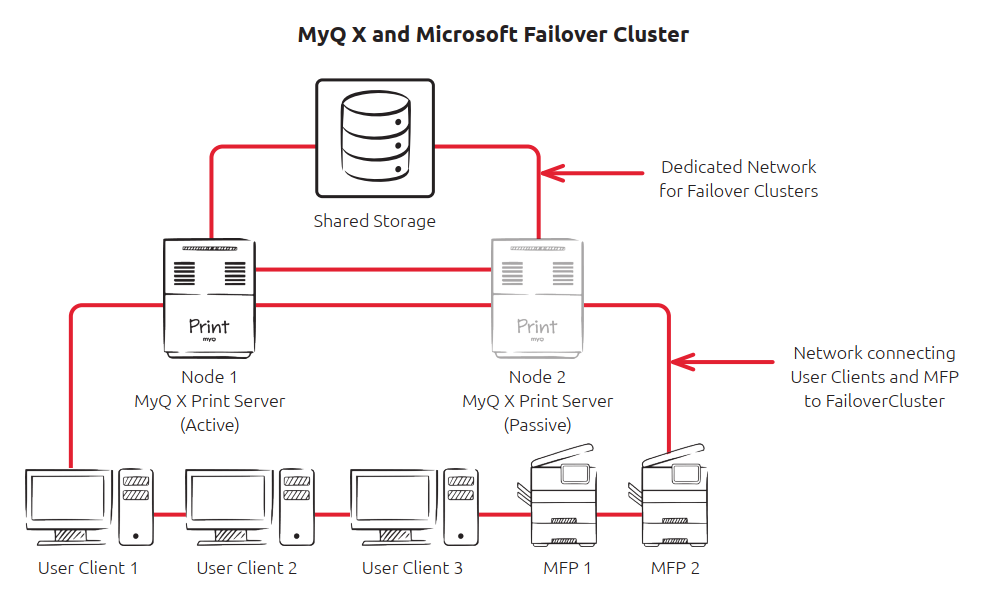
Microsoft Failover Clustering primarily protects against node-level failure. Do not assume that every MyQ application or service failure will trigger cluster failover; include application-level monitoring and recovery in the operational design.
Microsoft Failover Clustering is appropriate when high availability of the MyQ server is a business requirement and your organization already has, or is prepared to operate, Windows Server clustering infrastructure. It introduces greater infrastructure and operational complexity than a standalone MyQ server or VM-level high availability.
Before choosing this approach, verify the current MyQ system requirements, supported Windows Server versions, storage requirements, and cluster prerequisites in MyQ and MS Cluster.
Client Hostname Configuration
Client applications, such as MyQ Desktop Client and MyQ Mobile Client, should be configured to connect to the cluster hostname or IP address, not to an individual node. If clients are pointed at a node directly, they will lose connectivity when that node fails over, regardless of whether the cluster itself is functioning correctly. Confirm this before rollout.
Virtual Machine High Availability (VMHA)
When MyQ runs in a virtual machine, hypervisor high-availability features, such as VMware vSphere HA, can recover the MyQ server after a host failure. The VM's files are stored on shared storage, for example an NFS or iSCSI datastore, that every host in the cluster can access. If the host that runs the MyQ VM fails, the HA platform restarts the VM on another host.
The MyQ VM keeps its data through the restart, because the embedded database and the jobs folder are inside the VM's files. If MyQ uses an external SQL Server database, that database server needs its own availability plan.
Server-based printing is unavailable while the VM restarts. The fallback features described earlier on this page can cover that gap.
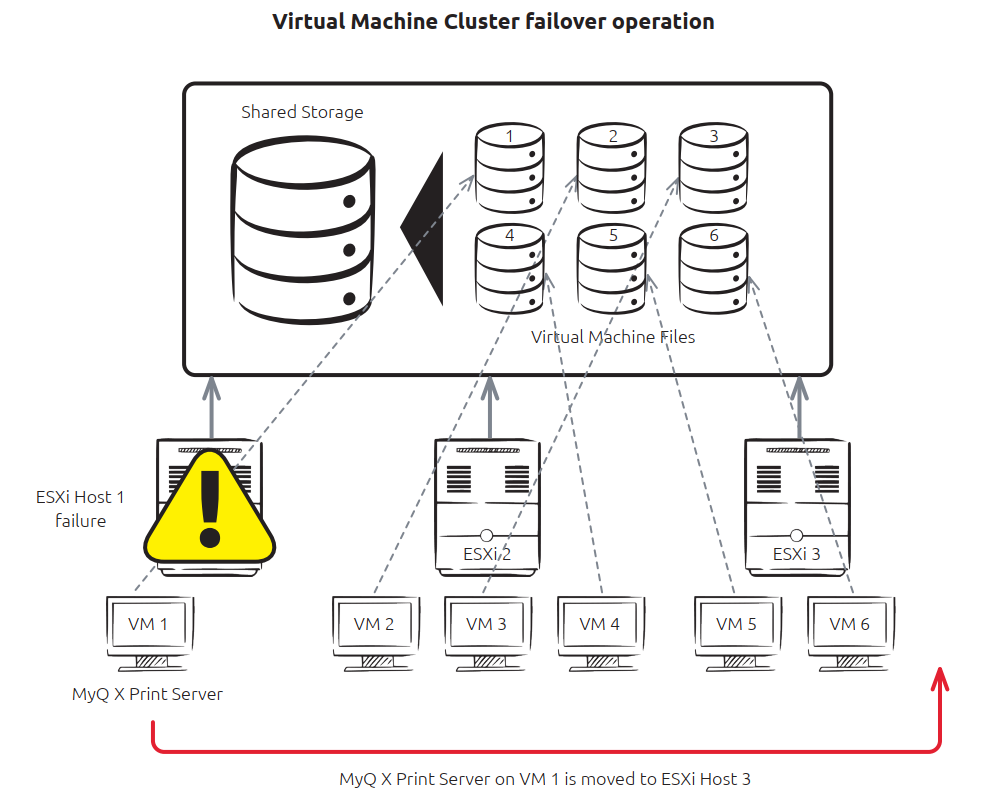
This approach is generally simpler than deploying MyQ in a Windows Failover Cluster, because it doesn't require application-level Windows clustering. The recovery time depends on the virtualization platform and its HA configuration.
Consider VM-level HA when you need protection against host failure but the extra complexity of Microsoft Failover Clustering isn't justified.
Licensing: Moving a VM to another host can change the hardware signature that the MyQ license is bound to. The Virtual Machine High Availability (VMHA) license feature tolerates these changes without reactivation. It is included with Enterprise licenses and enabled by default. It requires the MyQ server to be a domain member, except in Microsoft Azure. For more information, see License Settings.
Choosing a Server HA Approach
|
|
Microsoft Failover Clustering |
Virtual Machine HA |
|---|---|---|
|
Protection model |
MyQ runs across active/passive Windows cluster nodes |
The virtualization platform recovers the MyQ VM after host failure |
|
Infrastructure |
Windows Failover Clustering |
Hypervisor HA |
|
Complexity |
Higher |
Generally lower |
|
Recovery |
Failover to another cluster node |
VM restart or relocation |
|
Best suited to |
Environments with stringent server-availability requirements and clustering expertise |
Virtualized environments primarily protecting against host failure |
Recovery Objectives and Backups
Before choosing a server HA approach, agree two targets with the business:
-
Recovery time objective (RTO): how long printing through the MyQ server can be unavailable. The shorter the RTO, the more it favors Microsoft Failover Clustering. If an outage while the VM restarts is acceptable, VM-level HA may be enough. In either case, the fallback features on this page can keep selected workflows running during the gap.
-
Recovery point objective (RPO): how much MyQ data, such as configuration, users, and accounting, you can afford to lose. RPO determines how often you back up MyQ.
High availability protects against hardware and host failures, not against data loss. Cluster nodes share the same storage, and VM HA restarts the same virtual disk, so corrupted or deleted data is not recovered by failover. Back up MyQ regularly, keep copies in a separate location, and test the restore procedure. For details, see Backup and Restore in MS Cluster.
Choose the approach according to the failures you need to tolerate, required recovery time, existing infrastructure, and operational expertise.
Server HA and print fallback address different failure scenarios and can be used together. HA restores the MyQ server service; Offline Login, Device Spooling, and Fallback Printing can preserve selected user workflows while the server is unavailable.