
For many organizations, the MyQ Desktop Client (MDC) is the main connection between your users and your printing environment. For this reason, we have created the MDC with a series of customizable options so that it reflects your company branding, and can direct users to helpful resources.
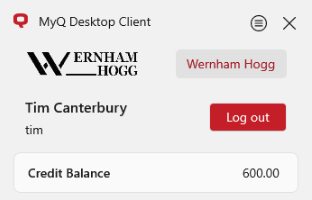
Set Up a Company Logo
Similarly to personalizing the Embedded Terminals, a configured custom logo can be used by the MyQ Desktop Client to show your organization’s branding.
When no custom logo is used, the default logo of MyQ is used instead.
Recommendations for Custom Logos
-
Supported formats: JPG/JPEG/PNG/BMP. Transparent backgrounds are recommended for PNG images.
-
Recommended size: 398px x 92px
Custom Links
A custom link can be displayed in the Desktop Client. This helps you to direct users to a page with useful information they might need.
The link is configured in Settings > Personalization > Custom link in the MyQ Desktop Client.
Recommendations for Custom Links
-
You can set the link to point to the MyQ Web Interface so that users have easy access to it.
-
It might be useful to propagate a link to your intranet or a dedicated page with news, announcements, resources, help links, links to our End-User Guide, or any other content.
-
Ideally, the title should not exceed 25 characters, but if it does, it will be split into multiple rows.