
This page describes additional configuration and maintenance steps, and troubleshooting information.
Bringing the resources of the MS Cluster online (Failover Cluster Manager)
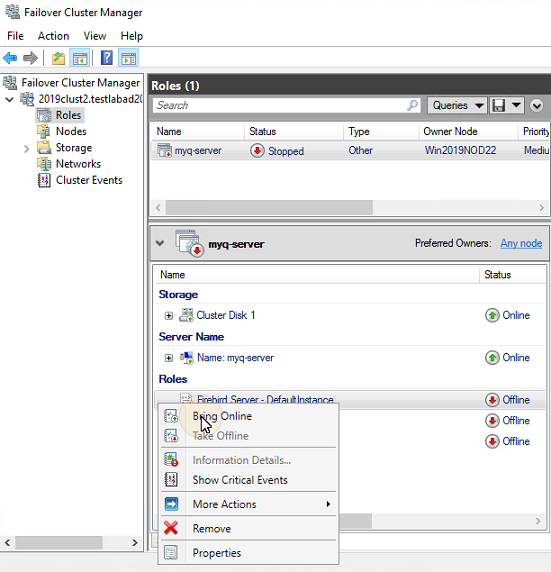
To start the system, you need to bring all the MS Cluster resources online - the Firebird Server - DefaultInstance service, the ApacheMonitor.jse script, the MyQMonitor.jse script and the Terminal Monitor script (only if embedded terminals are used).
To bring a service or script online, open the Failover Cluster Manager application, go to Roles, right-click the service or script, and click Bring Online on the shortcut menu.
Taking the MS Cluster resources offline (Failover Cluster Manager)
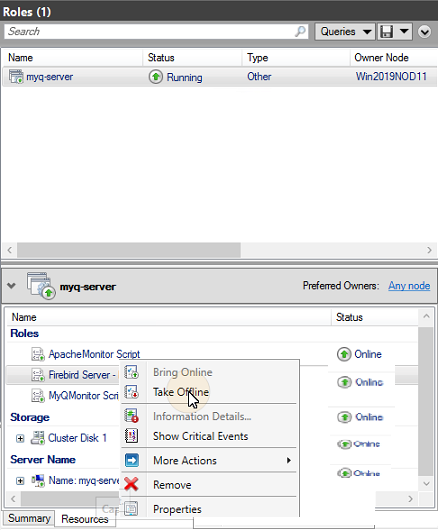
To make sure that all the MS Cluster resources -except for Storage and Server Name- are offline, it is sufficient to take the Firebird Server - DefaultInstance service offline; all of the scripts will be taken offline due to their dependency on this service.
The Storage and Server Name resources must stay online.
To take the Firebird Server - DefaultInstance service offline, open Failover Cluster Manager, go to Roles, right-click the Firebird Server - DefaultInstance service, and click Take Offline on the shortcut menu.
Restarting MyQ services via the MS Cluster (Failover Cluster Manager)
To restart MyQ services via the MS Cluster, take all the MS Cluster resources, except for Storage and Server Name, offline and then bring them online.
Changing the MyQ admin credentials (active node)
To change the Web Administrator Account and Database Administrator passwords, you need to do the following on the currently active node (the current owner of the MyQ server role):
-
Open the Failover Cluster Manager application.
-
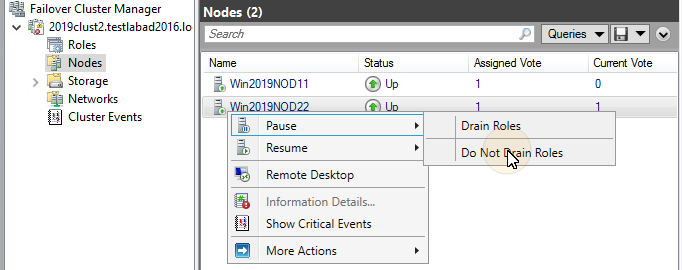
Open the Nodes tab of the cluster, right-click the currently active node, right-click Pause on the shortcut menu, and click Do Not Drain Roles.
-
Take all the MS Cluster resources, except for Storage and Server Name, offline.
-
Open the MyQ Easy Config application, start all services, change the passwords, stop all services, and lastly close the application.
-
Bring the resources of the cluster online.
-
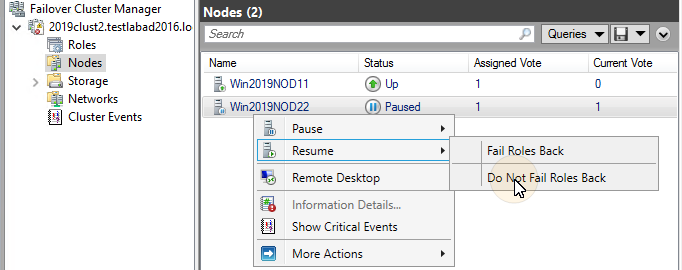
Open the Nodes tab of the cluster in Failover Cluster Manager, right-click the node, right-click Resume on the shortcut menu, and lastly click Do Not Fail Roles Back.
Troubleshooting
The MS Cluster solves issues on the currently active node which might affect the availability of the MyQ server, by switching to one of the available passive nodes.
Problems related to the MyQ server need to be treated manually. In case you encounter such problems, it is recommended to restart MyQ services in the Failover Cluster Manager application. If the problem persists, contact MyQ support.
In case the MS Cluster does not start, try taking all the MS Cluster resources, except for Storage and Server Name, offline, and then try to manually start MyQ services. If successful, it is likely that the problem is on the cluster side; otherwise the problem is probably related to the MyQ server, in which case contact MyQ support.