
MyQ X is a distributed system consisting of servers, client applications, embedded terminal packages, and supporting services. Use the diagram below to identify the components required for your deployment.
Consider how users will print, scan, authenticate, release jobs, use mobile devices, and access MyQ services. The components you need depend on your deployment model, printer fleet, authentication requirements, scan workflows, mobile printing, reporting, and availability requirements.
This page provides a planning-level overview of the main MyQ components. For installation, configuration, ports, and detailed requirements, see the relevant MyQ Server and component documentation.
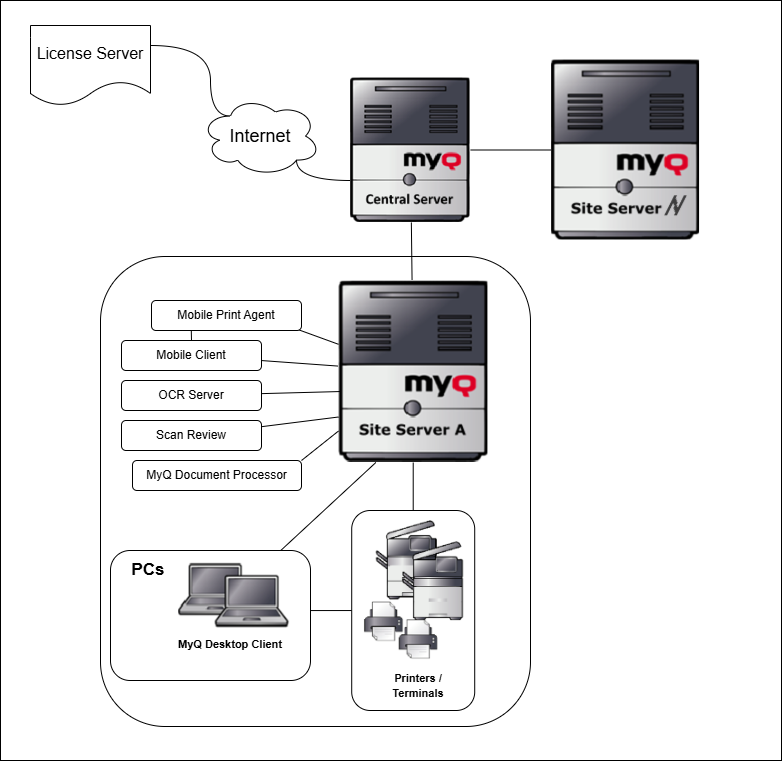
Core Server Components
Print Server / Site Server
Print Server is the core MyQ X component. It manages print, scan, and device operations, including printers, queues, jobs, users, embedded terminal communication, reporting data, and local system configuration.
Every MyQ X deployment requires at least one Print Server. Consider whether one Print Server is sufficient or whether the environment requires multiple Print Servers for scale, location-based printing, local resilience, or separate administration.
A Site Server is the same component operating as part of a Central/Site deployment. It is connected to a Central Server while continuing to handle local print, scan, and device operations at its site.
Central Server
Central Server is used in Central/Site deployments with multiple Site Servers. It provides central licensing, consolidated reporting, user distribution, and selected shared configuration for connected Site Servers.
Use Central Server when multiple locations or Print Servers require shared reporting, administration, user distribution, or coordinated management.
Central Server does not replace local Site Server administration. Site Servers still require local setup, monitoring, maintenance, backup planning, and site-specific configuration.
User-Facing Components
Embedded Terminals
Embedded terminals are applications installed on supported multifunction devices. They let users authenticate and access supported MyQ functions directly from the device panel, including print release, copying, scanning, and other terminal actions.
Use embedded terminals when users require secure access to device functions, authenticated print release, user-specific scan workflows, or accounting directly at the device.
Available functions and behavior depend on the device vendor and model, terminal package, license, configuration, and MyQ version.
MyQ Desktop Client
MyQ Desktop Client is installed on user workstations. Depending on its configuration, it can provide user authentication, job metadata collection, project or cost-center selection, local printer monitoring, client spooling, fallback printing, and other workstation-side printing features.
Use MyQ Desktop Client when printing must be controlled or enriched on the user workstation, particularly for project accounting, client spooling, fallback printing, local printer monitoring, or prompts before job submission.
MyQ X Mobile Client
MyQ X Mobile Client gives users access to selected MyQ functions from mobile devices.
Use MyQ X Mobile Client when users need features such as mobile printing or interaction with their print environment without using a workstation.
Supporting Components
Mobile Print Agent
Mobile Print Agent supports mobile printing through protocols such as AirPrint and Mopria. It is typically deployed where mobile devices need to discover printers or MyQ queues on the local network, such as a Wi-Fi segment used by mobile users.
Use Mobile Print Agent to provide AirPrint or Mopria printing from iOS, macOS, or Android devices.
MyQ Document Processor
MyQ Document Processor is a supporting service that performs document-processing operations for MyQ scan workflows. It processes jobs received from MyQ X and returns the resulting documents for delivery to their configured destinations.
Use MyQ Document Processor for scan workflows that require supported document-processing functions, including OCR and conversion to searchable document formats.
Document processing can require significant CPU, memory, and storage resources. Consider installing MyQ Document Processor on a separate machine, particularly in environments with frequent scanning or large documents.
MyQ Scan Review
MyQ Scan Review adds a review and approval stage to Easy Scan workflows. Users scan documents at a device as usual, after which authorized reviewers can inspect the scanned images and record the result of the review before the paper originals are archived.
Use Scan Review when the organization requires a documented and auditable replacement-scanning process. It is intended to support compliance workflows such as those based on Germany’s TR-RESISCAN guidelines.
Scan Review requires additional planning for reviewer access, workflow responsibilities, metadata, document retention, and integration with the organization’s archiving process. It supports the review workflow but does not by itself constitute a complete compliant archiving solution.
OCR Server (Deprecated)
OCR Server is a legacy supporting component used to perform optical character recognition in scan workflows, enabling output such as searchable PDFs and recognized text.
OCR Server is deprecated. For new deployments, use MyQ Document Processor where it supports the required document-processing workflow. Existing deployments should consider migration requirements when planning an upgrade.
Because OCR processing can require significant resources, OCR Server may need to run on a separate machine.
External Systems and Integrations
Depending on the deployment model and enabled features, MyQ X may depend on external systems such as identity providers, directory services, mail servers, cloud storage providers, licensing services, reporting tools, backup locations, monitoring systems, or BI tools.
Plan these dependencies early because they can affect authentication, user synchronization, scanning, notifications, reporting, firewall rules, certificates, availability, and support ownership.