
Network planning starts with identifying which MyQ components, clients, devices, and external services must communicate in your deployment. Focus on the paths used for printing, scan reception and delivery, authentication, administration, reporting, licensing, and any enabled integrations.
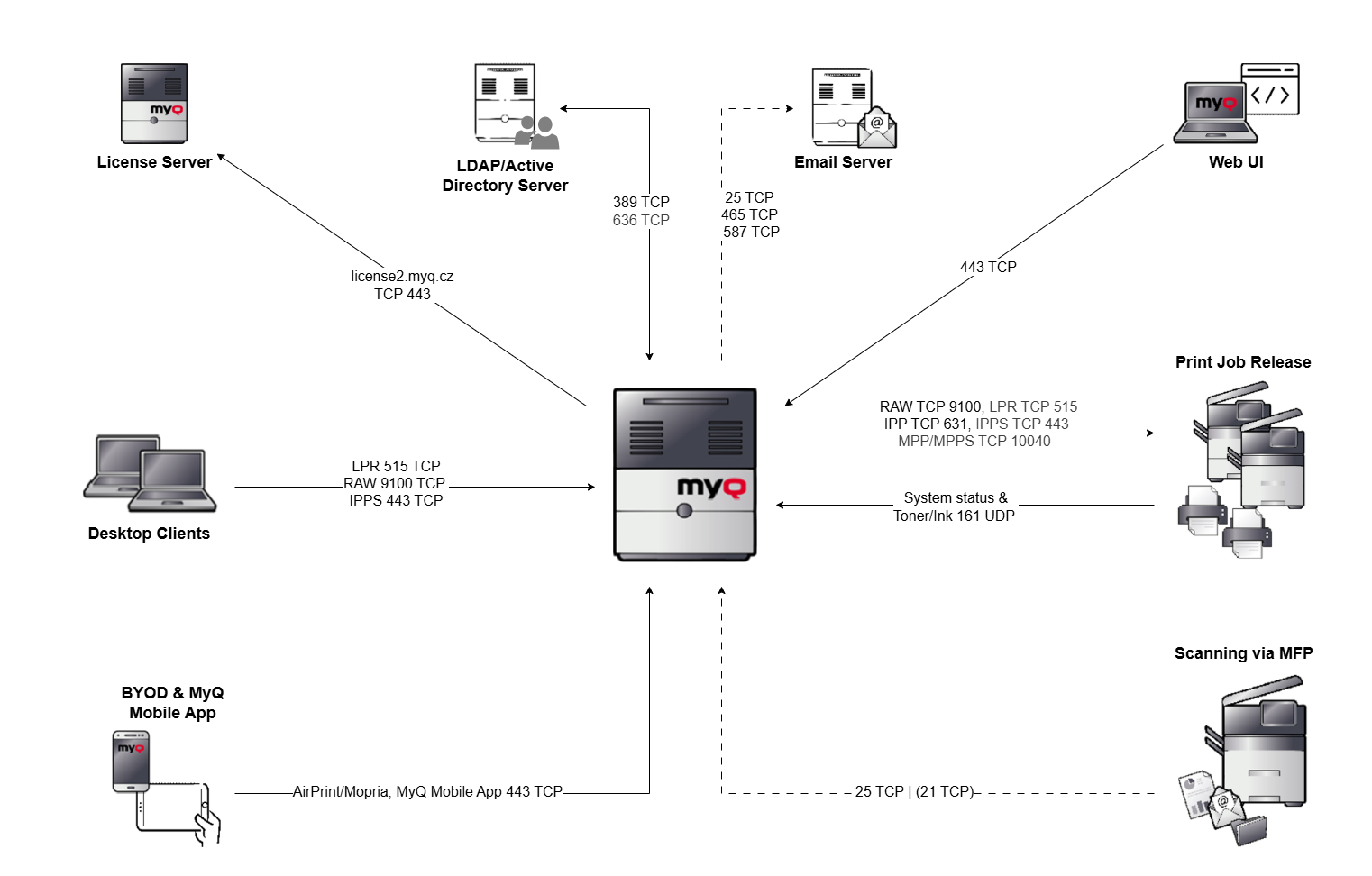
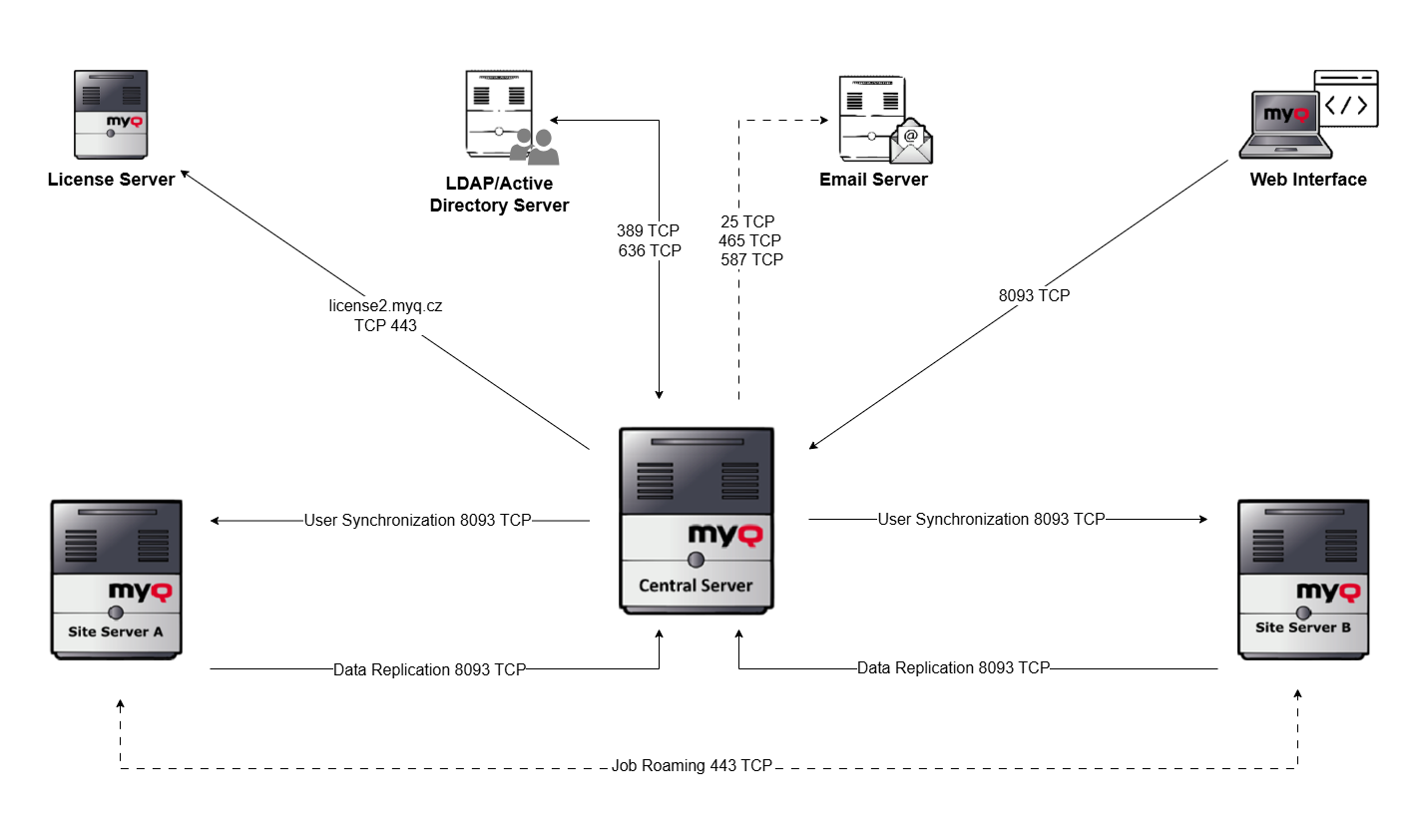
Use the diagrams below as a reference map before completing the checklist. Focus on the connections that apply to your environment, especially traffic that crosses sites, network zones, or external services.
These diagrams are planning references, not a comprehensive port matrix. The current port, protocols and version-specific defaults are in the MyQ X Server guide:
Standalone Print Server
Central/Site Environment
Network Planning Checklist
Before deployment, confirm the main network paths that MyQ depends on.
-
Server placement and site topology
Decide where each Print Server, Site Server, Central Server, OCR Server, and Mobile Print Agent will run. Place services close enough to users, printers, and required scan destinations to avoid unnecessary WAN dependency, especially where large print jobs or scan files would otherwise cross slow or unreliable links. -
Client, mobile, and user access
Confirm how users and workstations connect to MyQ, including MyQ Desktop Client, MyQ X Mobile Client, AirPrint, Mopria, and Mobile Print Agent where used. Consider users who move between sites and need access to jobs, printers, or cloud storage from different locations. -
Printer and embedded terminal communication
Confirm that MyQ servers can reach printers for monitoring, configuration, and print delivery. Also confirm the scan paths used in your deployment, including how scans are received from devices and how MyQ delivers scans to email, folders, cloud storage, FTP servers, or other configured destinations. Embedded terminals must be able to communicate with the required MyQ server, and any vendor-specific terminal requirements should be checked before rollout. -
Central, site, and identity communication
Confirm reliable communication between Central Server and Site Servers, including DNS, routing, certificates, and firewall rules. In cloud and hybrid deployments, this does not necessarily require a VPN between the Central Server and Site Servers; check the current cloud deployment and port requirements for the selected model. Also confirm access to the user sources and authentication services used in your deployment, such as LDAP/LDAPS directories, Microsoft Entra ID, Google Workspace Secure LDAP, RADIUS, or other configured authentication providers. -
External services, mail, scan, storage, and certificates
Confirm access to the external services used in your deployment, such as mail servers, scan destinations, cloud storage, licensing services, Microsoft or Google endpoints, remote backup locations, and monitoring systems. Define stable DNS names and certificate requirements before production, rather than relying on temporary hostnames or IP addresses. -
WAN resilience and rollout validation
Identify sites with slow, weak, or unstable links and decide whether they need a local Site Server, Client Spooling, Device Spooling, Offline Login, or another fallback option. Verify each fallback option against the relevant MyQ X Server, Desktop Client, and embedded terminal documentation before rollout. Before rollout, test the paths used in your deployment, such as printing, scan reception and delivery, authentication, embedded terminal login, mobile printing, reporting, remote backups, and expected behavior during network restrictions or outages.