
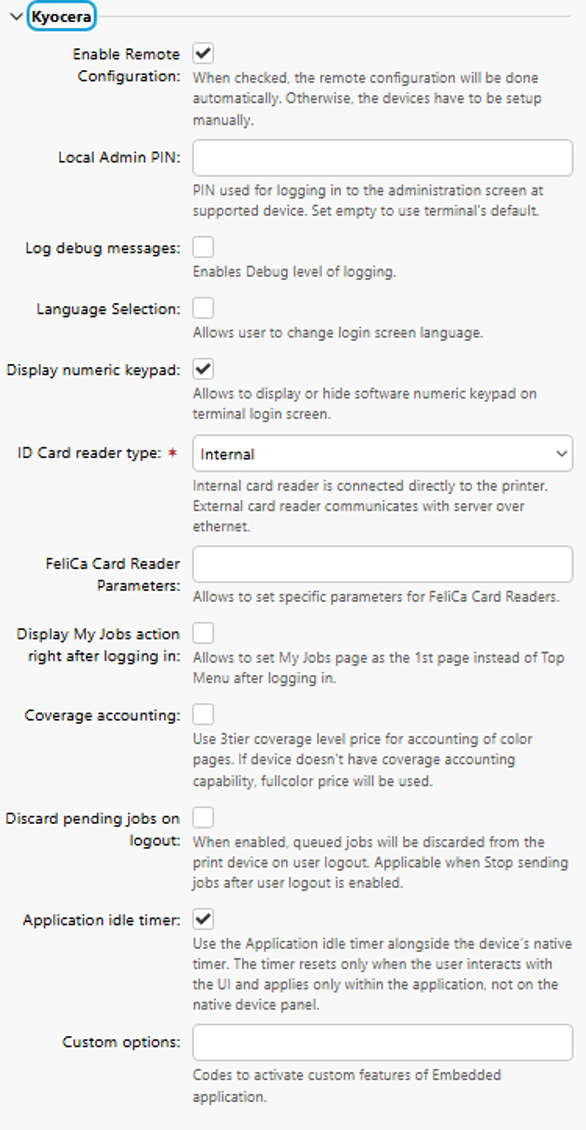
After you install the terminal package on the Print Server, the following vendor-specific options are available in Configuration Profiles:
-
Enable Remote Configuration
When checked, the remote configuration will be done automatically. Otherwise, the devices have to be setup manually. -
Local Admin Pin
Set the PIN number that is used to log in to the terminal as an administrator. When the field is empty, the default value 1087 is used. -
Log debug messages
Set logging level to Debug. When enabled, the terminal generates additional log information for auditing and troubleshooting.
This setting applies to all printers that use the configuration. To log debug messages on one printer, use a separate configuration profile for that printer only.
-
Language Selection
Enables users to change the terminal screen language. -
Display numeric keypad
Displays a numeric keypad on the terminal login screen. This options is enabled by default. -
ID Card reader type
Specify the ID Card reader. Available options are:-
Internal (default)
An internal card reader is directly connected to the printer. -
External
An external card reader communicates with the server over ethernet.
-
-
FeliCa Card Reader Parameters
Set parameters for FeliCa card readers. -
Display My Jobs action right after logging in
Enable this option to display the My Jobs terminal action on the first terminal screen after login. -
Coverage accounting
Enables three-tier accounting (low, medium, high) based on toner coverage for color print and copy. If coverage accounting is not available on the device, the full color price is used. -
Discard pending jobs on logout
Cancels all in-progress jobs when the user logs out. For security reasons, this option is enabled by default. For more information, see Discard Jobs on User Logout in Cancelling Stuck Jobs. -
Application idle timer
Use the Application idle timer alongside the device’s native timer. The timer resets only when the user interacts with the UI and applies only within the application, not on the native device panel. -
Custom options
An administrator can unlock some hidden features of the terminal that are available only to specific customers and might require specific device/firmware.
Applying the changes in the Kyocera section on the terminal requires a force remote configuration of the device.