
In the Quick Setup Guide widget, you can set the basic and most important features of the MyQ system.
License
In this section you can add and activate licenses.
-
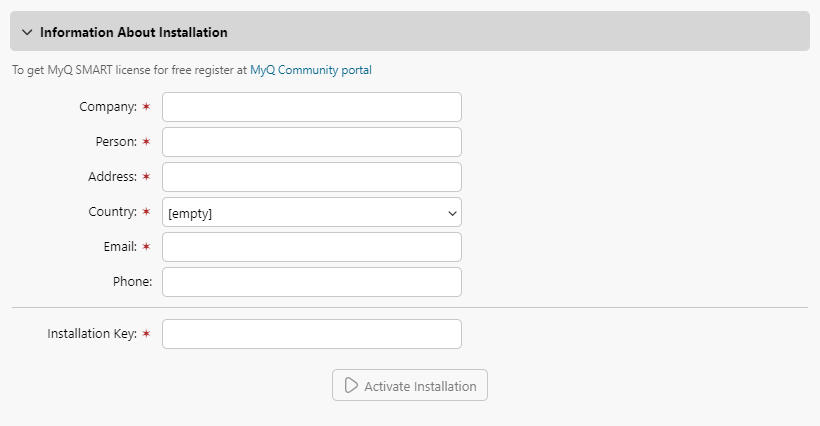
Click Enter License. The License settings tab opens. You are asked to enter the following information about your installation:
-
Enter your installation key.
-
Click Activate Installation.
You can also register in the MyQ Community portal and request a free MyQ SMART license.
Administrator email
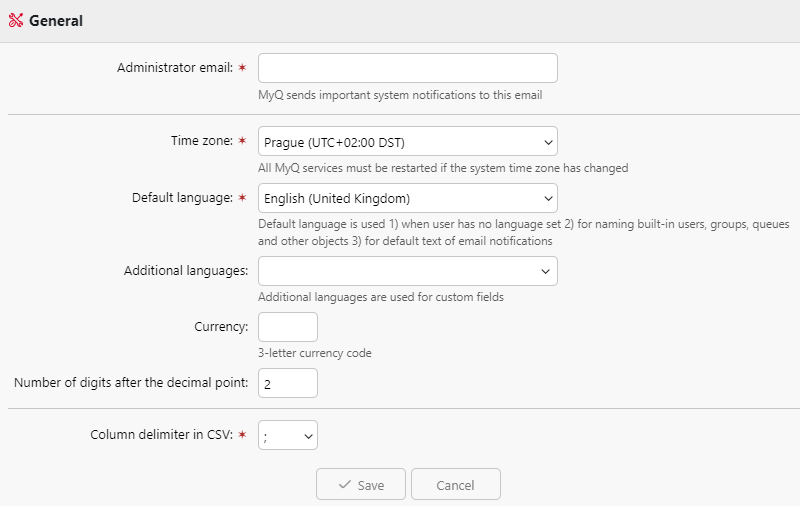
By clicking Enter the administrator's email, you open the General settings tab, where you can set the administrator email. Important system messages (disk space checker warnings, license expiration etc.) are automatically sent to this email.
Password for communication
To communicate with your site servers you must set a password. By clicking Enter the password, you open the General settings tab, where you can set the password for network communication, in the Security section.
Outgoing SMTP server
By clicking Configure the outgoing SMTP server, you open the Network settings tab, where you can set the outgoing SMTP server.
Users
-
By clicking Add users manually, you open the Users main tab, where you can manually add users.
-
By clicking Import users, you open the Users synchronization settings tab, where you can import users from the MyQ Central server, from LDAP servers, or from a CSV file.