
Document Sorting and Identification
Document ID Parameter
Easy Scan supports custom scan parameters that the admin can configure to appear on the scan panel and be included in the resulting filename. By adding a Document ID parameter, the admin creates a field the Scan Operator must fill in at the point of scanning – using an ID that was physically attached to the document during preparation (e.g. written on a cover sheet, sticky note, or pre-printed label as part of document prep).
Because this ID is embedded directly into the filename, it travels with the digital scan through to the Scan Review document list, giving the reviewer a direct, human-readable key to match a queue entry back to its physical original – without relying on stack order, timing, or QR/barcode automation.
Document Processor
Scan Review can be coupled with MyQ Document Processor, which can help prepare the documents for review by splitting a batch of scanned documents by barcode/QR code, or removing blank pages.
This integration currently has the following limitations:
-
Automatic operations are not reflected in Scan Review workflows: If an automatic process alters a document, reviewers may be required to perform manual quality control. Scan Review does not enforce this.
-
Automatic operations are not included in Transfer Note: The Transfer Note contains the settings used to scan the document, such as color, resolution, and duplex.
-
Barcode value currently cannot be extracted: The barcode value read by Document Processor cannot be used in the scanning and archiving process.
Consider the impact of these limitations before integrating Scan Review with Document Processor.
These points will be resolved in future Scan Review and Document Processor releases.
Archived PDF/A
The final product of Scan Review is a PDF/A file intended for long-term archiving with two embedded attachments. Optionally, the file can be digitally signed with an embedded timestamp.
The two embedded attachments are:
-
Transfer Note (PDF)
-
Metadata file (XML)
Transfer Note
When a reviewer approves a document, Scan Review compiles the transfer note – combining this configured metadata with the mandatory information it generates automatically during capture, review, and approval – attaches it to the document, applies the signature, and delivers the finished PDF.
Transfer Note Process Metadata
Configurable Process Metadata
-
Header: optional free-text block (e.g. client/contractor identification) rendered at the top of the transfer note for organizational or contractual context.
-
Process Name: identifies which scanning procedure produced the batch, so a transfer note can be traced back to the procedural documentation in force at the time of scanning.
-
Variant: identifies the configured branch of that process (e.g. standard vs. simplified), supporting the same traceability to procedural documentation.
-
Version: records which revision of the procedure was active when the note was generated, for later audits of whether the correct process was followed.
-
Effective Date: the date this template version takes effect; defaults from the document queue's creation date but can be overridden.
-
Document Language: controls the language of the labels and headings shown on the note.
-
Owner: the administrator or process owner responsible for this template configuration.
Automatically Generated Metadata
-
Scanning Step
-
Scan Processing
-
Quality Assurance
This data is automatically generated by Scan Review. Information is taken from the scan metadata XML file created by MyQ X during the scanning process, which is transferred with the scan.
Transfer Note Example
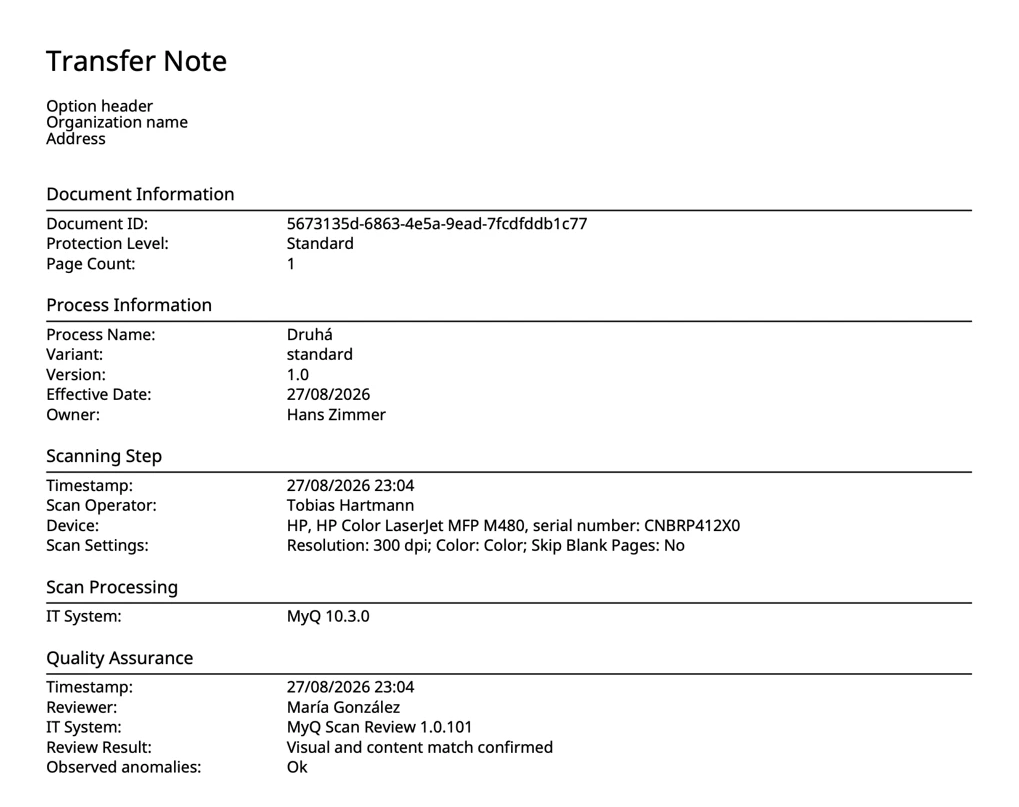
Metadata File
The metadata file contains the technical information about the scanning process (combined from MyQ X and Scan Review itself).
<?xml version="1.0" encoding="utf-8"?>
<scanData>
	<timestamp>2026-08-28 10:44:34</timestamp>
	<profile>MSR</profile>
	<username>john.smith</username>
	<version>
		<MyQ>10.3.0</MyQ>
	</version>
	<fields>
		<field>
			<name>Resolution</name>
			<value>300 dpi</value>
			<reference>scan.resolution</reference>
			<code>503</code>
		</field>
		<field>
			<name>Color</name>
			<value>Color</value>
			<reference>scan.color</reference>
			<code>704</code>
		</field>
		<field>
			<name>Format</name>
			<value>PDF</value>
			<reference>scan.format</reference>
			<code>101</code>
		</field>
		<field>
			<name>Duplex</name>
			<value>Single Sided</value>
			<reference>scan.duplex</reference>
			<code>301</code>
		</field>
		<field>
			<name>Continuous scan</name>
			<value>Disabled</value>
			<reference>scan.continuous</reference>
			<code>802</code>
		</field>
		<field>
			<name>Scan Separation</name>
			<value>All pages together</value>
			<reference>scan.separation</reference>
			<code>902</code>
		</field>
		<field>
			<name>Original Image</name>
			<value>Text + Photo</value>
			<reference>scan.image</reference>
			<code>1001</code>
		</field>
		<field>
			<name>Original Orientation</name>
			<value>Top Edge on Left</value>
			<reference>scan.orientation</reference>
			<code>1102</code>
		</field>
		<field>
			<name>Density</name>
			<value>1200</value>
			<reference>scan.density</reference>
		</field>
		<field>
			<name>Size</name>
			<value>Automatic</value>
			<reference>scan.size</reference>
			<code>1301</code>
		</field>
		<field>
			<name>Mixed size</name>
			<value>Off</value>
			<reference>scan.mixedSize</reference>
			<code>1702</code>
		</field>
		<field>
			<name>Skip Blank Pages</name>
			<value>No</value>
			<reference>scan.skipBlankPage</reference>
			<code>1802</code>
		</field>
		<field>
			<name>Background suppression</name>
			<value>2002</value>
			<reference>scan.backgroundSuppression</reference>
		</field>
		<field>
			<name>Level</name>
			<value>Standard</value>
			<reference>scanReview.level</reference>
			<code>100</code>
		</field>
		<field>
			<name>Document Queue</name>
			<value>Druhá</value>
			<reference>scanReview.queue</reference>
		</field>
		<field>
			<name>Model</name>
			<value>HP Color LaserJet MFP M480</value>
			<reference>scanReview.model</reference>
		</field>
		<field>
			<name>Brand</name>
			<value>HP</value>
			<reference>scanReview.brand</reference>
		</field>
		<field>
			<name>Serial number</name>
			<value>CNBRP412X0</value>
			<reference>scanReview.serial</reference>
		</field>
		<field>
			<name>Processing</name>
			<value>Skip by 3 pages</value>
		</field>
	</fields>
	<files>
		<file>john.smith_264428-104445-ab55.pdf</file>
	</files>
	<project>
		<name/>
		<code/>
	</project>
	<ip>hpjlan</ip>
	<transferNote generatedAt="2026-08-28T08:45:54.3011089+00:00">
		<documentInformation>
			<documentId>1116ae8d-38d9-4433-84cc-cd2b292d513b</documentId>
			<protectionLevel>Standard</protectionLevel>
			<pageCount>3</pageCount>
		</documentInformation>
		<processInformation>
			<header>Option header
Organization name
Address</header>
			<processName>Druhá</processName>
			<variant>standard</variant>
			<version>1.0</version>
			<effectiveDate>27/08/2026</effectiveDate>
			<owner>Hans Zimmer</owner>
		</processInformation>
		<scanningStep>
			<timestamp>28/08/2026 08:44</timestamp>
			<operator>
				<displayName>John Smith</displayName>
			</operator>
			<device>
				<brand>HP</brand>
				<model>HP Color LaserJet MFP M480</model>
				<serialNumber>CNBRP412X0</serialNumber>
			</device>
			<scanSettings>
				<resolution>300 dpi</resolution>
				<color>Color</color>
				<skipBlankPages>No</skipBlankPages>
			</scanSettings>
		</scanningStep>
		<qualityAssurance>
			<timestamp>28/08/2026 08:45</timestamp>
			<reviewer>María González</reviewer>
			<itSystem>MyQ Scan Review 1.0.101</itSystem>
			<reviewResult>Visual and content match confirmed</reviewResult>
			<observedAnomalies>OK, no abnormalities</observedAnomalies>
		</qualityAssurance>
		<scanProcessing>
			<itSystem>MyQ 10.3.0</itSystem>
		</scanProcessing>
	</transferNote>
</scanData>