
This section describes how to set up and manage user accounts in MyQ. It covers adding, importing, synchronizing, and deleting users, user authentication, managing user and group settings, and more.
Each Site server connected to your MyQ Central server can synchronize users directly from the Central server and be almost entirely dependent on the changes made there, described below.
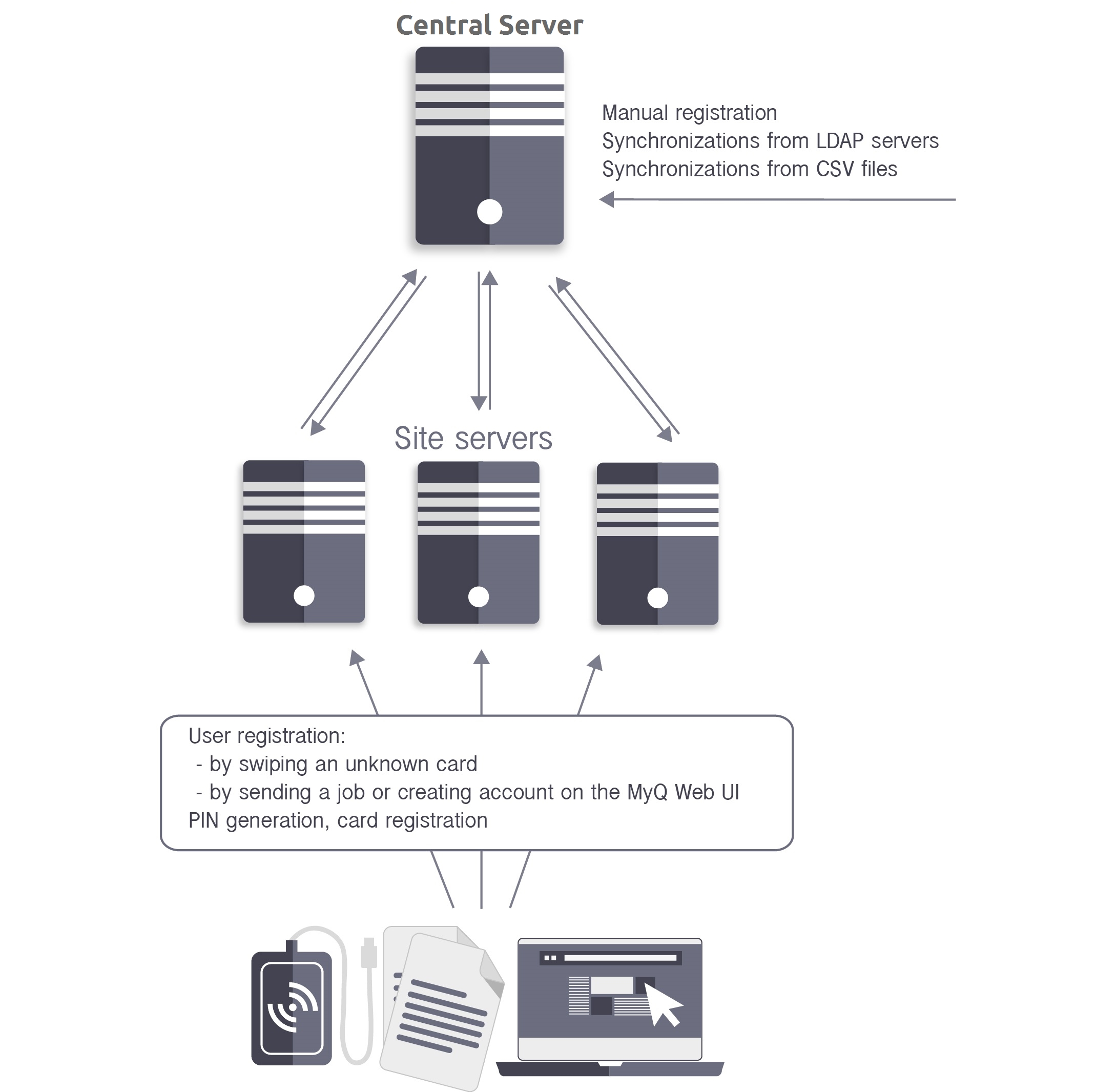
There are, however, a few exceptions:
-
Users can register themselves by swiping an unknown ID card, on the Web user interface, by sending a job via LPR protocol, or by sending a job via email. The newly created user is automatically replicated to the Central server. If the connection to the Central server is working, the user is automatically added to the server database and also replicated to the Central server database. From there, the accounts are imported to all other sites using the Central server as a synchronization source during the scheduled process of synchronization. If there is no online connection to the Central server, the registration of the new user fails.
-
Users that are already in the system can change their language and generate PIN on the Web User Interface. In addition, they can register their cards on MyQ terminals. Every such change has to be authorized by the Central server. If there is no connection to the Central server, the registration of the new PIN/card fails.
-
The administrator can add a new card, and add or generate a new PIN for users that are already in the system. Every change has to be authorized by the Central server. If there is no connection to the Central server, the registration of the new PIN/card fails.
In the following sections, you can find information on user management options on the MyQ Central server.
On the Users main tab, you can see users and information about them. With the All users search option selected, you see a list of all the users that are currently in the system.
Apart from this search option, you can also choose from:
-
Unclassified - select to display only the users that do not belong to any group
-
Managers - select to display only group managers
-
Locked - select to display users whose accounts have been locked
-
Deleted - select to display only deleted users
Default system users
The database of every installation of MyQ contains five default system users. These users are used for administration of the MyQ system and cannot be deleted.
-
*admin - This is the MyQ administrator account. It is used for administration of the MyQ system on the Web Administrator User Interface.
-
*api - MyQ uses this account to connect to external applications.
-
*fax - All printed faxes are charged to this account.
-
*unauthenticated - If there are any printed, copied or scanned pages that for some reason cannot be assigned to concrete users, they are charged to this account. This can happen, for example, if the print server is not available and users print in an emergency, offline mode on a printing device. It can also happen if someone prints directly on a printing device, bypassing the MyQ system. In such
cases, you might need to check the printing device security settings. -
*system - All the actions performed by the MyQ system are charged to the *system user.