
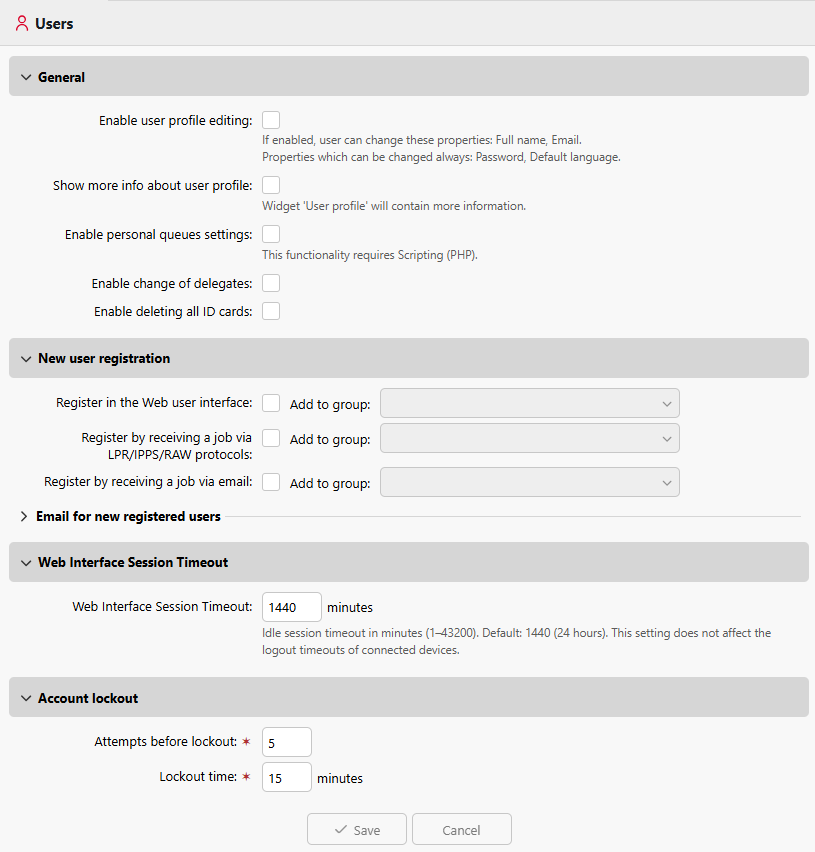
In the Users settings tab (MyQ > Settings > Users), you manage MyQ users’ General settings, New user registration settings, Web Interface Session Timeout, and MyQ Account lockout options.
General Settings
-
Enable user profile editing - If enabled, users will be able to change their full name and email.
-
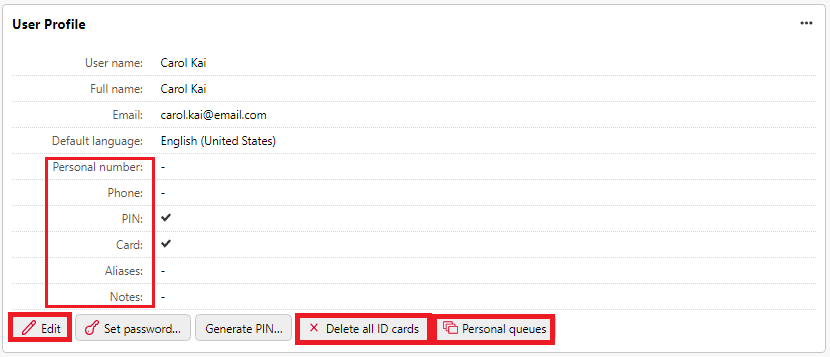
Show more info about user profile - If enabled, the User profile widget will contain more user-related information (Personal number, Phone, PIN, Card, Aliases, Notes).
-
Enable personal queues settings - If enabled, users can use personal queues.
-
Enable delegate changes - If enabled, users will be able to change their delegates.
-
Enable deleting all ID cards - If enabled, users will be able to delete all their ID cards.
More Information
If all of the above are enabled, the users can view additional user information, Edit their account, Delete all ID cards, and use Personal Queues in their User profile widget:
New user registration
Enable and configure automatic user registration to MyQ in a variety of ways. For more information, see Automatic User Registration.
Web Interface Session Timeout
Set the idle timeout duration for web sessions, in minutes. If a user session is inactive for longer than the configured period, the session expires and the user must log in again. Changes take effect immediately for new requests without requiring a server restart.
-
Range: 1 to 43,200 minutes (up to 30 days)
-
Default: 1,440 minutes (24 hours)
Account lockout
Configure the maximum failed login attempts before a user is locked out, and the duration of the lockout time.
-
Attempts before lockout
Number of failed login attempts before user is locked out.-
Range: 1 – 100
-
Default: 5
-
-
Lockout time
Period, in minutes, that a user must wait before they can attempt to log in again.-
Range: 1 – 144,000
-
Default: 15
-