
This section describes the main configuration options for MyQ Document Processor (MDP).
To open the configuration, right-click the Systray Agent and select Configure.
The Configuration window also provides controls for managing the MDP service and applying configuration changes:
-
Stop Service: Stops the Document Processor service.
-
Re/Start Service: Starts the service if it is stopped. Restarts the service if it is running.
-
Save: Saves the current configuration.
-
Cancel: Closes the window without saving changes.
Configuration changes take effect after the Document Processor service is restarted. After changing the configuration, select Save, then Re/Start Service.
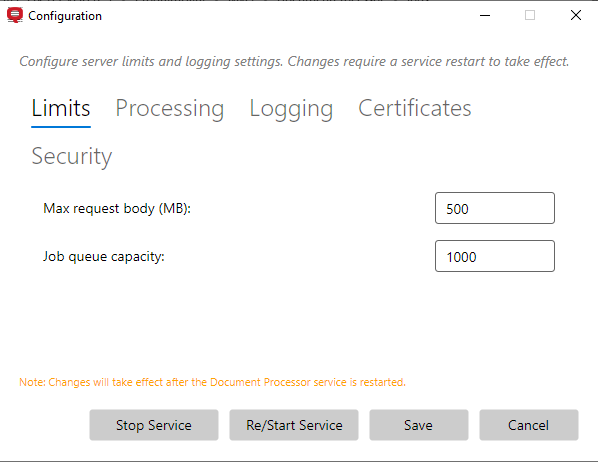
Limits
Use the Limits settings to configure size and capacity limits for MDP.
-
Max request body (MB): Specifies the maximum size of an incoming request that MDP accepts. Default: 500 MB. If this limit is exceeded, a
413 Payload Too Largeresponse is returned. -
Job queue capacity: Specifies the maximum number of jobs that can be held in the MDP processing queue. Default: 1000. If the server cannot accept more jobs in the queue, a
503error is returned.
Processing
Use the Processing settings to configure how MDP processes and retains jobs.
-
Simultaneous jobs: Specifies the maximum number of jobs that MDP can process at the same time. Default: 2.
-
Maximum CPU usage (%): Specifies the maximum percentage of CPU capacity that MDP can use for document processing. Default: 100%.
-
Max processing timeout (seconds): Specifies the maximum time allowed for processing a job. Default: 600 seconds.
-
Keep finished jobs for (days): Specifies how long a completed job and its results stay available for download from the moment the job finishes. Default: 5 days.
Queued or incomplete jobs are never removed.
Logging
Use the Logging settings to set the logging level and log retention for MDP.
-
Log level: Specifies the logging level used by MDP. Select the required level from the list.
-
Verbose
-
Debug
-
Information (Default)
-
Warning
-
Error
-
Fatal
-
-
Logs retention (days): Specifies how many days log files are retained. Logs older than the configured period are automatically removed. Default: 90 days.
Certificates
Use the Certificates settings to manage the certificates used by MDP for HTTPS communication.
-
Certificate Aliases: Optional, additional DNS names to include in the server certificate. Separate multiple aliases with commas. Only DNS names are supported. IP addresses are ignored. If clients need to connect using an address that does not have a suitable DNS name, create a DNS record for the IP address and add the DNS name as an alias instead.
-
Server certificate validity (days): The validity period of newly generated server certificates, in days. Default: 365 days.
-
Server certificate will renew after: Displays the date and time when the current server certificate is scheduled for renewal. To regenerate immediately, click Regenerate Now.
-
CA certificate validity (days): The validity period of newly generated internal CA certificates, in days. Default: 730 days.
-
CA certificate will renew after: Displays the date and time when the current CA certificate is scheduled for renewal. To regenerate immediately, click Regenerate Now. Regenerating the CA certificate requires the new CA certificate to be installed or trusted again on client machines.
-
Certificate renewal threshold (days): Specifies how many days before certificate expiration MDP automatically renews the certificate. Default: 30 days.
-
Certificate grace period (minutes): The period during which the the old certificate remains available after renewal. Default: 5 minutes.
Security
Use the Security settings to invalidate all access tokens issued by MDP.
-
Revoke All Access Tokens: Deletes the current JWT signing key and generates a new key. All existing access tokens become invalid and clients must obtain new tokens. Revocation affects authentication only. Nothing is deleted apart from the tokens, and no data is lost.