
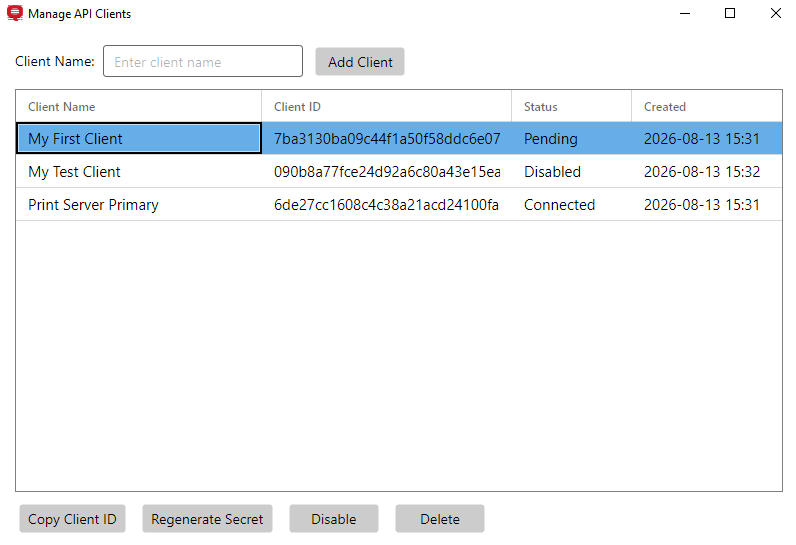
An API client is defined by the credential pair Client ID and Secret, used by MyQ Print Server to use MyQ Document Processor. To manage clients, right-click the tray icon and select Manage Clients.
Each client has the following attributes:
-
Client Name: a label to identify the client.
-
Client ID: a unique identifier for the client.
-
Status:
-
Pending: enabled, waiting for client to authenticate.
-
Connected: enabled and has authenticated at least once.
-
Disabled: Client is disabled. Document Processor blocks connections from a disabled client.
-
-
Created: The date and time when the client was created.
When you select a client, these actions are available:
-
Copy Client ID: copy the client ID to your clipboard.
-
Regenerate Secret: issue a new security key for the client.
-
Disable: block the client from connecting to Document Processor.
-
Delete: remove the client.
Add a Client
-
Enter a Client Name and click Add Client.
The client name is displayed in the client manager only. -
Record the Client ID and Secret.
You will need this information when you define a connection in MyQ. -
Click Close.
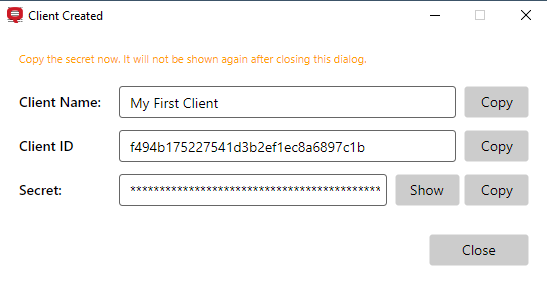
The Secret is visible only during client creation. Secrets cannot be recovered later, and must be regenerated. Go to Manage API Clients, select the client and click Regenerate Secret.