You manage MyQ Document Processor through the Systray Agent and the installer. Most settings are saved during installation and can be changed later by rerunning the installer in modify mode.
The Systray Agent is a desktop application that provides local monitoring and management for Document Processor. It runs in the Windows notification area (system tray).
The Systray Agent provides a lightweight UI for status monitoring, log access, and API client management.
Service Status
The tray icon tooltip shows the Document Processor service status:
-
Online: The local Document Processor service responded to an HTTP request.
-
Offline: The Systray Agent could not reach the local Document Processor service.
The Systray Agent treats any HTTP response as Online, including 401 Unauthorized. This is expected because the tray app does not authenticate with an API key.
Systray Agent Options
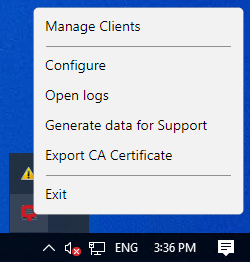
Click the Systray Agent icon to open the menu and access the options. The following options are available:
-
Manage Clients: create, enable, disable, regenerate secrets and delete clients.
-
Configure: set limits, processing options, logging level, and manage certificates and security.
-
Open Logs: access Document Processor log files.
-
Generate data for Support: export a ZIP file for troubleshooting by our Support team.
-
Export CA Certificate: export a ZIP file containing the CA certificate, and a batch script to install the certificate. Use this when you configure a remote client to trust the Document Processor server.