
Once the MyQ server role is created and configured, MyQ resources need to be configured as well, in the Roles tab in Failover Cluster Manager.
Add the Firebird server - MasterInstance service to the MyQ server role:
-
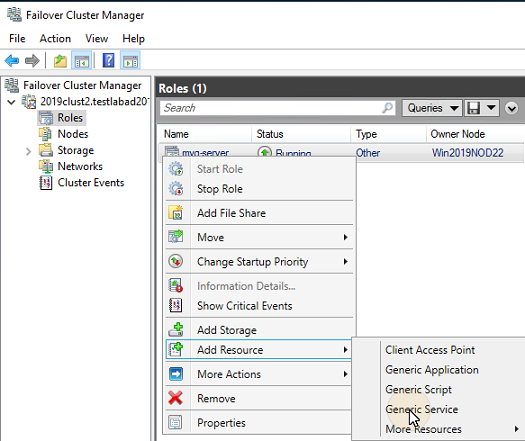
Right-click the MyQ server role, then click Add resource on the shortcut menu, and click Generic Service. The New Resource Wizard opens.
-
In the list of services, select Firebird Server - MasterInstance, and click Next.
-
On the Confirmation tab, click Next to create the service. The service is created and configured.
-
Click Finish to leave the setup.
Add the Apache Monitor script to the MyQ server role:
-
Right-click the MyQ server role, click Add resource on the shortcut menu, and click Generic Script. The New Resource Wizard opens.
-
Enter the path to the ApacheMonitor.jse script, located in the MyQ installation folder, and click Next. The Confirmation tab opens. The default path to the script is:
C:\Program Files\MyQ Central Server\Server\ApacheMonitor.jse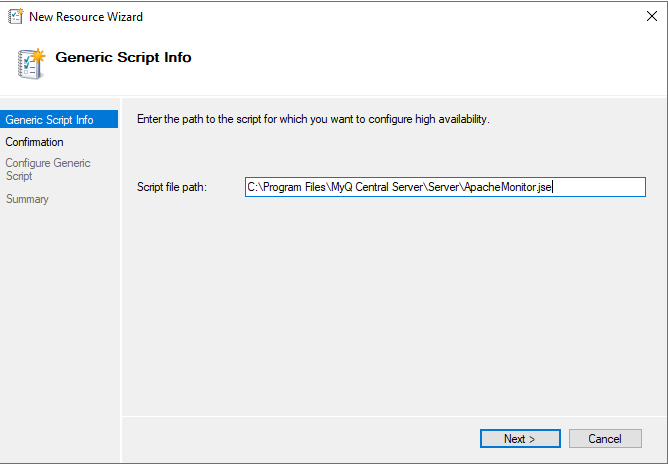
-
On the tab, click Next to create the service. The service is created and configured.
-
Click Finish to leave the setup.
Add the MyQ Monitor script to the MyQ server role:
-
Right-click the MyQ server role, click Add resource on the shortcut menu, and click Generic Script. The New Resource Wizard opens.
-
Enter the path to the MyQMonitor.jse script, located in the MyQ installation folder, and click Next. The Confirmation tab opens. The default path to the script is:
C:\Program Files\MyQ Central Server\Server\MyQMonitor.jse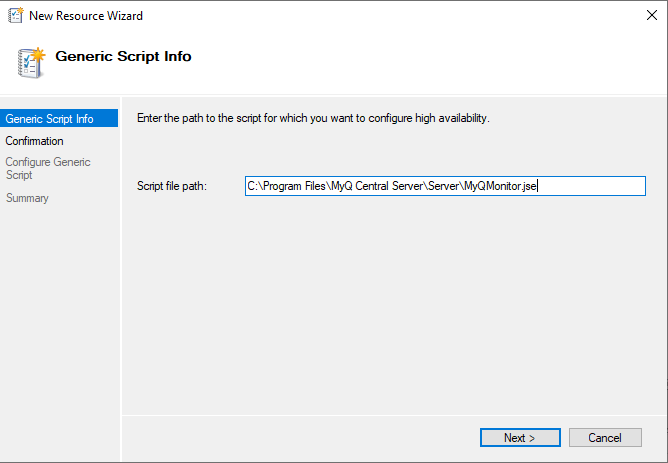
-
On the tab, click Next to create the service. The service is created and configured.
-
Click Finish to leave the setup.
If you are using an MS SQL database instead of the Embedded database, you don't need to add the Firebird server - MasterInstance service to the MyQ server role. You should only add the Apache Monitor script, and the MyQ Monitor script.