
MyQ performs registered checks which can return error messages with their level of severity and they can be viewed in the system health check. The errors concern database health, disk space availability, PIN length settings, time zone configuration, etc.
Every error message is logged in the MyQ main log.
When the error message has a Critical severity, the related MyQ service is stopped and the administrator gets an email notification about it.
To access the system health check overview, log in as admin to MyQ and go to MyQ, System health check, or click on the system health check icon on the top-right side of the window.

-
Set your search criteria in the left pane.

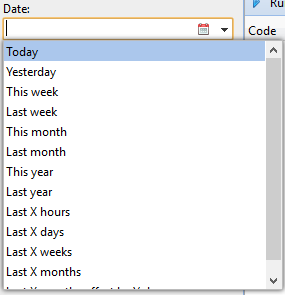
You can search for errors on a specific Date by clicking the calendar icon. If you want to set a wider range search, click the arrow to choose a date:
Select a Severity from the drop down list.
-
Click Search. The search result is shown in the right pane.
-
Click Run to trigger the System health check Task schedule to perform a check with these date and severity settings.
Error Codes
The system health check presents you with an overview of error messages with the level of severity added after some registered checks are done. The errors concern database health, disk space availability, PIN length settings and time zone configuration, etc.
Error codes and their severity are listed in the table below.
|
Code |
Severity |
Description |
|---|---|---|
|
101 |
High |
Main database health is not good; multiple messages can appear in the log |
|
102 |
High |
Log database health is not good; multiple messages can appear in the log |
|
103 |
Medium |
PIN length needs to be increased |
|
104 |
High |
Disk space is on warning level |
|
105 |
Critical |
Disk space is on critical level |
|
106 |
High |
Time zones misconfiguration |
|
109 |
High |
License subscription is going to expire |
|
110 |
High |
License Subscription expired |
|
111 |
High |
Contacting license server failed |
|
112 |
High |
HW code mismatch |
|
113 |
High |
License activation required |
|
114 |
High |
License expires soon |
When the error message has a Critical severity, the administrator gets an email.
Every error message with a Low severity is logged in the MyQ main log.