
The Toshiba service is an integral part of the embedded terminal's installation. It is added to Windows services within the upload of the Toshiba Embedded installation package to the MyQ server and remains there as long as the installation package stays uploaded on the server.
The service is necessary for the proper terminal functionality; if it is not running, the embedded terminal cannot communicate with the MyQ server. With disabled communications, users cannot log in and the terminal cannot be remotely set up (reinstalled, uninstalled).
The service can be started and stopped on the Services tab of the MyQ Easy Config application, where it’s called Toshiba Terminals followed by the package version, for example Toshiba Terminals 10.2.0.229. For details about the application, see MyQ Easy Config in the MyQ Print Server guide.

You can also check the current status of the service on the Services tab of Windows Task Manager, where it is listed with:
-
Name: MyQ_Toshiba_<packageId>, for example MyQ_Toshiba_005b8ed4. The package ID is unique to each installed package. You can find it in the ID column of the Terminal Packages list, under Settings > Printers & Terminals in the MyQ Web administrator interface.
-
Description: MyQ Toshiba Terminals <version>, for example MyQ Toshiba Terminals 10.2.0.229.
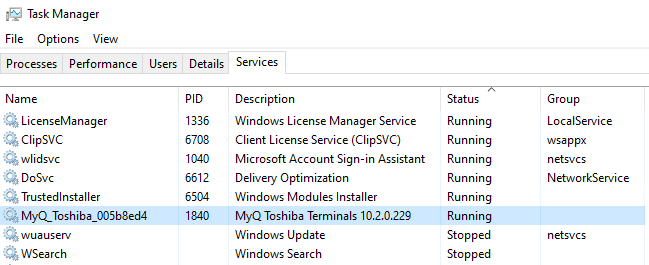
Since MyQ 10.2, more than one version of the Toshiba package can be installed at the same time, for example during an upgrade. Each version runs as its own service with its own package ID; use the Description column to tell them apart.
The service’s executable file is MyQToshibaTerminal.exe for every package version. If you set up antivirus exclusions for MyQ, use this file name rather than the service name, which is different for each package.