There are ten predefined alerts on the Events settings tab. These correspond to common situations, such as empty toner or a printer out of paper, or to states of printing devices that require particular actions, such as technical support or supply check. They are triggered by the following states of a printing device:
-
Call service — The printing device requires authorized technical service.
-
Check supplies — Consumables of the printing device need to be checked.
-
Cover open or Paper jam — Either a device cover is open or a paper is jammed.
-
Out of paper — The printing device is out of paper.
-
Toner almost empty — One or more toners on the device are almost empty.
-
Toner empty — One or more toners on the device are empty.
-
Toner below 20%_C — The Cyan toner on the device is below 20%.
-
Toner below 20%_K — The Black toner on the device is below 20%.
-
Toner below 20%_M — The Magenta toner on the device is below 20%.
-
Toner below 20%_Y — The Yellow toner on the device is below 20%.
Changing the toner level to be monitored
The toner level to be monitored is set to 20% by default but can be easily changed following the instructions below:
-
On the alerts list on the Events tab, double-click the alert. The properties panel opens on the right side of the screen.
-
Change the value in the Level below field (in %).
-
Change the name of the alert according to the new monitored level.
Creating new events
To create a new event, click +Add and a select the type of event to be created.
Available event types:
-
SNMP alert - The SNMP alert event occurs when at least one of the predefined filter passes. If the event has no filters defined, it's never open. You can define the following filters: Code from, Code to, Severity, Training, Group, Group Index, Brand, Model.
-
Toner Status Monitor - The event occurs when the toner level decreases below a predefined threshold. When the toner level rises again to or above the threshold, the event is closed. The monitored toner (Black toner, Color toner, Any toner) can be configured.
-
Total Counter Increase - The event monitors when the print and copy counters on a device repeatedly reach a certain value. For each such event, two values need to be specified:
-
which type of counters should be monitored by this event; possible values are Print & Copy total, Print & Copy mono, Print & Copy color.
-
which repeatedly reached values should be monitored - this means that a value X needs to be specified and whenever the counters on a device reach a value that is evenly divisible by X, the actions are triggered
-
-
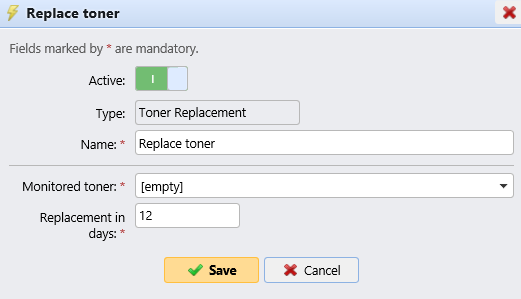
Toner Replacement - The event is used to predict toner depletion. For each such event, two values need to be specified:
-
monitored toner (Cyan toner, Magenta toner, Yellow toner, Black toner)
-
number of days that serve as threshold for triggering actions - this means that user specifies value X and whenever the predicted number of days left is less than or equal to this value, the associated actions get triggered
-
A properties panel opens to the right side of the screen. Fill in the mandatory information and click Save.