
The options on this page cover the most commonly used settings for printer discovery. For details about advanced options related to other MyQ features, see the MyQ Embedded Terminal guides.
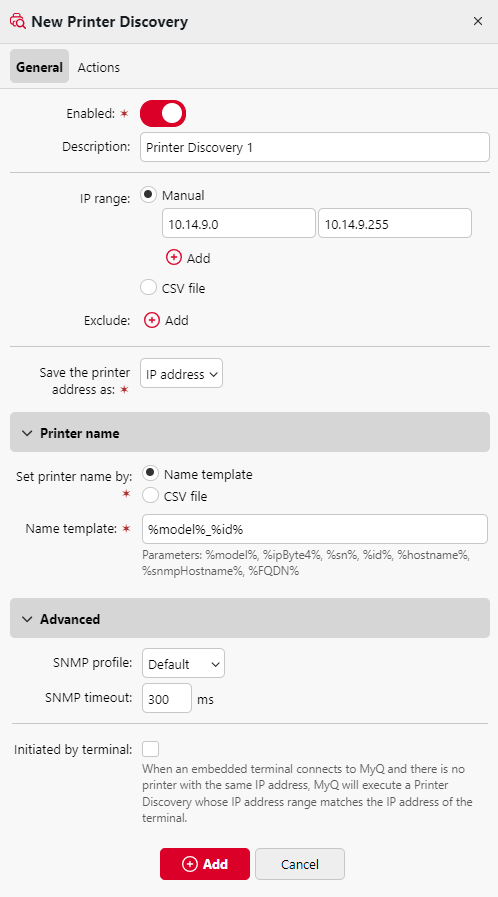
-
Enabled – Enables the discovery to be included in the scheduled run of print discoveries.
-
Description – Specifies a custom description of the printer discovery.
-
IP range – Defines the range of IP addresses used for discovery. Initially, the range is automatically detected from the server IP.
-
You can edit the ranges manually, or define ranges by importing a CSV file (one column, ascending order). You can also add and delete additional ranges.
-
To exclude an individual IP address, click +Add next to Exclude.
-
-
Save the printer address as – Defines how the discovered device address is saved (IP address, Hostname, or FQDN).
-
Printer name – Specifies the names of discovered printers when they are added to MyQ, either using a name template or a CSV file.
-
Name template – Defines a template for naming discovered devices using substitution variables:
-
%model%– Model of the printing device -
%ipByte4%– Last byte of the device IP address -
%sn%– Serial number -
%id%– ID of the device in the MyQ database (if the printer name template contains this parameter, the name will not update if the devices is rediscovered) -
%hostname%– Hostname resolved by DNS -
%snmpHostname%– Hostname from the device MIB table via SNMP -
%FQDN%– Fully Qualified Domain Name of the device
-
-
CSV file – Define printer names with a CSV file containing two columns, enter the file path, and select the value type under First column in table.
-
The first column identifies the device by IP address, hostname or serial number.
-
The second column contains the printer name that you want to assign.
Example:list of IPs;Custom name 10.0.0.11;Printer Name 1 10.0.0.12;Printer Name 2 -
Only printers listed in the CSV file are added. Printers not listed are skipped.
-
-
-
SNMP – Defines the SNMP profile and timeout (in milliseconds), controlling how long MyQ waits for device responses.
-
Initiated by terminal – Enables discovery triggered by Java-based terminals that connect without a corresponding printer entry in MyQ.